Every day Sitewig takes a backup of your databases and keeps it for 30 days (90 days with Max). If a plugin has run amok, you've deleted posts by mistake or an update has gone wrong, you can put an older version back yourself from the control panel. Self-service restore is included in all paid web hosting plans.
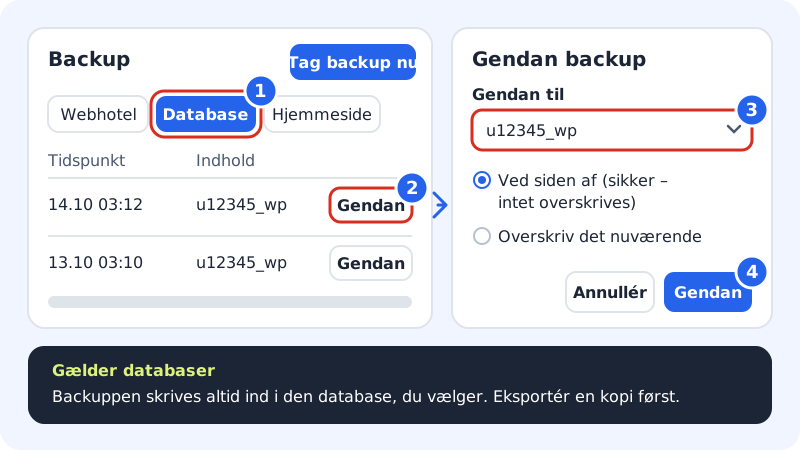
Restore the database
Step 1: Open the Database tab
Go to Web hosting → Backup and click the Database tab. The list shows all backups with Time, Type and Contents (the database name).
Step 2: Choose the right backup
Find the most recent backup from before the error occurred and click Restore on that line. If you're unsure about the time, choose a slightly older backup.
Step 3: Choose the database
In the Restore backup panel, choose the database under Restore to, e.g.
u12345_wp. Normally the same database is already selected.Step 4: Start the restore
Click Restore. You may be asked to confirm your sign-in again before the restore starts. Once it's under way you see the message Restore started, and under Restores you can follow the status.
Step 5: Test your website
When the status shows as finished, open your website and check that the content is as you expect. Small databases are restored within a couple of minutes.
Frequently asked questions
How far back can I go?
30 days, or 90 days with Max. Older backups are deleted automatically.
I deleted the whole database under Databases. Can it be restored?
A deleted database can't be chosen as a target. Create it again under Web hosting → Databases with exactly the same name (e.g. wp, so that it is once more called u12345_wp), and then restore the backup to it. Remember that the new database gets a new password, which needs to go into your website. If it doesn't work, contact support.
Can I see the old version without overwriting the current one?
Not yet for databases: a backup can only be put back into the database it was taken from. Export the current version first, and you can always import it again. If you need to compare two versions, contact support.
Why am I told that a restore is already running?
You can only run one restore at a time. Wait until the first one has finished and try again.