With Sitewig you do not pay for AI each time you use it. Every plan has a fixed monthly limit for AI edits and the other AI features. The limits start again on the 1st of every month, and you can always see how much you have used.
The kinds of AI usage
The control panel shows your usage in counters. Their names depend on whether the names NinaAI and AYAAI are switched on for your account:
The counters and their names in the control panel
- Websites with NinaAI
- Also called Websites with AI. A whole new website that NinaAI creates for you
- AI edits with NinaAI
- Also called AI edits on websites. A task for NinaAI, for example new text or a new section
- AYAAI (Max only)
- What AYAAI builds and changes in your apps uses your Energy (100 Energy a month) instead of fixed AI edits
- AYAAI Max runs
- Also called Max runs in apps. The biggest tasks with AYAAI Max (Max only)
- AI replies in webmail
- AI help when you write emails in webmail
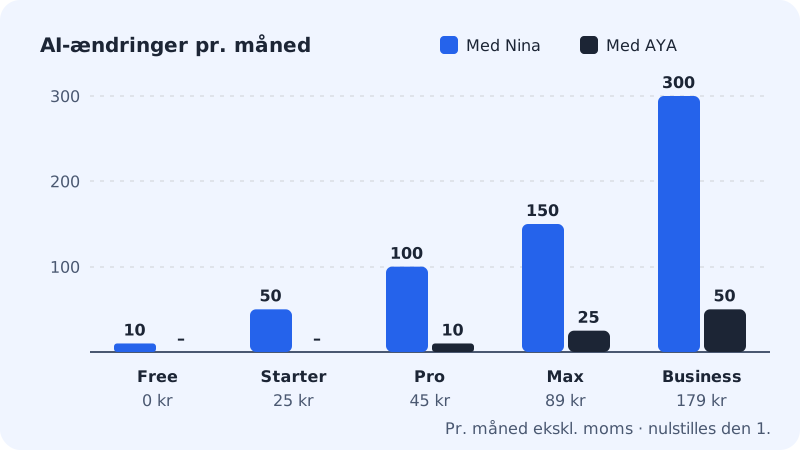
The limits for each plan
The figures are per month and reset on the 1st.
Free
- Websites with NinaAI
- 1
- AI edits with NinaAI
- 10
- AYAAI
- Not included
- AI replies in webmail
- Not included
Starter
- Websites with NinaAI
- 5
- AI edits with NinaAI
- 50
- AYAAI
- Not included
- AI replies in webmail
- 30
Pro
- Websites with NinaAI
- 10
- AI edits with NinaAI
- 100
- AYAAI
- Not included
- AI replies in webmail
- 100
Business
- Websites with NinaAI
- 20
- AI edits with NinaAI
- 150
- AYAAI
- Not included
- AI replies in webmail
- 300
Max
- Websites with NinaAI
- 40
- AI edits with NinaAI
- 300
- AYAAI
- 100 Energy a month that expires at the end of the month
- AYAAI Max runs
- 10
- AI replies in webmail
- 600
If you only have an email plan, you get AI replies in webmail: Essential gives 30 and Unlimited 300 per month.
What counts as one AI edit?
- Every message or task you send to NinaAI counts as one AI edit, no matter how many files or sections are changed.
- In the website builder, NinaAI's help with text, translation, SEO and suggestions also counts as AI edits with NinaAI.
- In the app builder, Sitewig decides for itself whether a message is a small fix (counts as an AI edit with NinaAI) or a bigger task that AYAAI builds. What AYAAI builds uses your Energy, which is only included in Max. Read more in How your AI edits are counted in the app builder.
What does not count?
- When you edit text and swap images directly on the page yourself. In the app builder this means clicking Edit above the preview.
- When you undo a change or restore an older version.
- The first automatic fixes if a build of your app fails.
- A task that did not start or that failed on Sitewig's side or at the AI provider. It is given back to you.
When you need more
Step 1: Buy an add-on
With the +100 AI edits add-on you get 100 extra AI edits with NinaAI as a one-off purchase. See Buy +100 extra AI edits.
Step 2: Or change plan
Open the Change plan page in the control panel (the address
/pakke) and choose a larger plan. An upgrade is charged pro rata straight away, and the new limits apply from the moment you switch.
Frequently asked questions
Are unused AI edits saved for next month?
No. The limits start again on the 1st of every month, and unused AI edits from the plan are not carried over. An add-on you have bought, however, also lasts for the whole of the following month.
What time of day do the limits reset?
At midnight UTC on the night before the 1st. In Denmark that is 1 a.m. in winter and 2 a.m. in summer.
Will my website stop if I use all my AI edits?
No. Your website and your apps keep running as normal. Only the AI help pauses until the limit resets or you buy more.