When you send an email, the recipient's mail server checks whether the email really comes from your domain. This is done with three records in the domain's DNS: SPF, DKIM and DMARC. If they are missing or wrong, there is a high risk that your emails will land in spam or be rejected.
In short: If you use Sitewig Mail and the domain's DNS is hosted with Sitewig, we set it all up for you. If your DNS is hosted somewhere else, you need to create the records yourself with that provider.
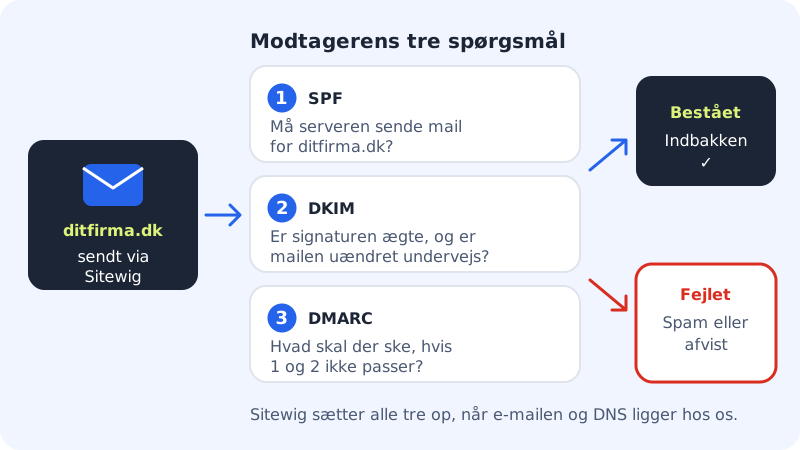
What do the three records do?
- SPF is a list of the servers that are allowed to send email for your domain. Sitewig's SPF says: the domain's own MX servers and
mail.sitewig.commay send. - DKIM is a digital signature. Sitewig's mail server signs every email, and the recipient checks the signature with a public key in your DNS. That shows the email hasn't been altered along the way.
- DMARC tells the recipient what to do if SPF and DKIM don't match. Sitewig uses
p=quarantine, which means "put it in spam".
The values for Sitewig Mail
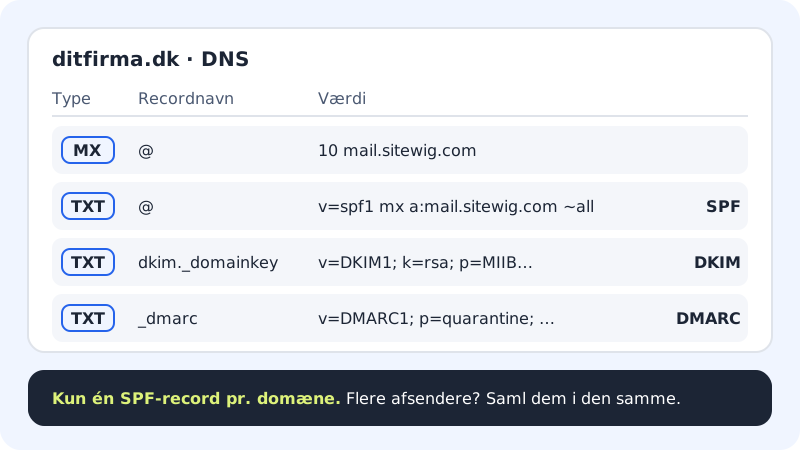
| Type | Name | Value |
|---|---|---|
| MX | @ | mail.sitewig.com with priority 10 |
| TXT (SPF) | @ | v=spf1 mx a:mail.sitewig.com ~all |
| TXT (DKIM) | dkim._domainkey | v=DKIM1; k=rsa; p=… (a long key that is unique to your domain) |
| TXT (DMARC) | _dmarc | v=DMARC1; p=quarantine; … |
Check your records with Sitewig
Step 1: Open the domain
Go to Domains → My domains and click the domain.
Step 2: See where email is delivered
On the The domain points to card, Email should show Sitewig Mail.
Step 3: Check the four records
Scroll down to the DNS list. If you like, choose
MXorTXTin the type filter to get a shorter list. Look for an MX record tomail.sitewig.com, a TXT on@that starts withv=spf1, a TXT ondkim._domainkeyand a TXT on_dmarc.Step 4: Is anything missing? Choose Sitewig Mail again
Click Change target on the The domain points to card. Under Where should email be delivered? choose Sitewig Mail and click Save. Sitewig then puts the standard email records on the domain again. Your own records are left in place.
Is your DNS hosted somewhere else?
If you use Sitewig Mail but manage DNS with another provider, you create the records there yourself:
- Create an MX on
@with the valuemail.sitewig.comand priority10. Remove the old MX records from your previous email provider. - Create a TXT on
@withv=spf1 mx a:mail.sitewig.com ~all, or mergea:mail.sitewig.cominto the SPF record you already have. - Create a TXT on
_dmarcwith a DMARC policy, for examplev=DMARC1; p=quarantine. - Contact support to get the DKIM key for your domain. It isn't shown in the control panel today.
Changes in DNS can take anything from a few minutes to a few hours to take effect.
Do you also use other services to send email?
If a newsletter service, a booking system or a web shop sends email in your domain's name, they need to be included in SPF too. There may only be one SPF record per domain, so you merge them:
Example of a combined SPF record
- Name
@- Type
- TXT
- Value
v=spf1 mx a:mail.sitewig.com include:_spf.example-service.com ~all
Use the include: value that the service itself provides. The service's own DKIM record (typically with a different name in front of ._domainkey) can sit alongside Sitewig's without any problem.
Test that it works
Send an email from your Sitewig address to an address with another provider. Open the email and choose to view the original message or the email's headers (the name varies between mail apps). Look for spf=pass, dkim=pass and dmarc=pass.
Frequently asked questions
I've chosen Own mail server (MX). Does Sitewig then create SPF and DKIM?
No. If email is delivered to your own mail server, Sitewig doesn't create SPF, DKIM and DMARC. You need to create them yourself, following your email provider's instructions.
What happens if the domain isn't going to use email at all?
If you choose No email, Sitewig sets SPF and DMARC to reject everything. This makes it harder for others to send fake emails in your domain's name.
Why can't I edit email records in the DNS list?
Records that Sitewig manages for you are locked so they don't get broken by mistake. They are changed by clicking Change target. You can edit and delete your own records via the menu next to the record.