With CalDAV (calendar) and CardDAV (contacts), your appointments and contacts are stored on Sitewig's server. If you create an appointment on your phone, it shows up on your computer, and the other way round.
Who has access?
Calendar and contacts are included in the Essential and Unlimited email plans. If you have email as part of a web hosting plan, contact support to find out whether calendar and contacts are included in your plan.
Server details
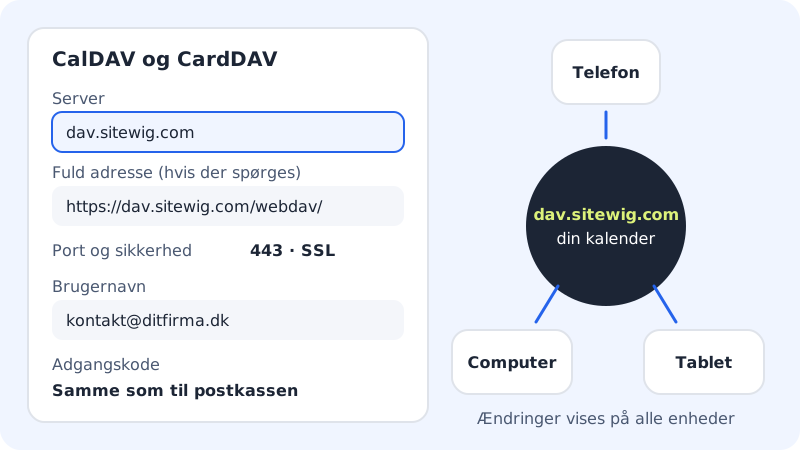
CalDAV and CardDAV
- Server
dav.sitewig.com- Full address
https://dav.sitewig.com/webdav/- Port
443(SSL)- Username
- Your full email address
- Password
- The mailbox password
Some apps only want the server name, others the full address. Try the server name first. If the app can't find the account, use the full address.
Set it up on iPhone and iPad
Menu names can vary slightly between iOS versions.
Step 1: Add a calendar account
Go to Settings → Apps → Calendar → Calendar Accounts → Add Account → Other, and tap Add CalDAV Account.
Step 2: Fill in the details
Type
dav.sitewig.comas Server, your full email address as User Name and the mailbox Password. If you like, type a Description, for example "Sitewig calendar". Tap Next.Step 3: Add contacts in the same way
Go to Settings → Apps → Contacts → Accounts → Add Account → Other, and tap Add CardDAV Account. Use the same details.
Step 4: Check that it works
Open the Calendar app and create a test appointment in the Sitewig calendar. It should show up on your other devices shortly afterwards.
Android
Android doesn't have built-in CalDAV and CardDAV. Install a sync app from Google Play (for example DAVx⁵) and choose sign-in with URL and username:
- Type
https://dav.sitewig.com/webdav/as the address. - Type your full email address and the mailbox password.
- Choose the calendars and address books to sync. They then appear in your phone's own Calendar and Contacts apps.
Thunderbird
- Calendar: Choose New Calendar → On the Network. Type your full email address as the username and
https://dav.sitewig.com/webdav/as the location. Sign in with the mailbox password and choose the calendar. - Contacts: Create a new CardDAV address book with the same address and login.
Frequently asked questions
The app says the login is wrong. What should I do?
Check that the username is the whole email address (for example kontakt@ditfirma.dk) and that you're using the mailbox password, not the control panel password. If you've changed the password recently, it needs to be updated here too.
Can I share a calendar with a colleague?
Sharing calendars between mailboxes can't be set up in the control panel today. Never share the mailbox password: send invitations to appointments from your calendar instead.
Does it work without https?
No. The connection must always be encrypted, so the address must start with https:// and the port is 443.