When a website needs to talk to its database, it has to know four things: the host, the database name, the username and the password. At Sitewig two of them are always identical, and the host is always the same. Here you can see where to find the values and where they go.
The values at a glance
Connection to your database
- Host (host name)
localhost- Port
3306(the default – rarely needs to be entered)- Database
- The full name, e.g.
u12345_wp - Username
- Same as the database, e.g.
u12345_wp - Password
- The password you saved when the database was created
Find the values in the control panel
Step 1: Open Databases
Go to Web hosting → Databases in the control panel.
Step 2: Find the database name and user
Each database is on its own line, with the name in bold. Below the name you see User, e.g.
u12345_wp, and the maximum number of connections the user may have at the same time.Step 3: See Host and Port
At the bottom of the page, under Connection, you see Host (
localhostwith a copy button), Port (3306) and Naming, which shows the pattern for your database names.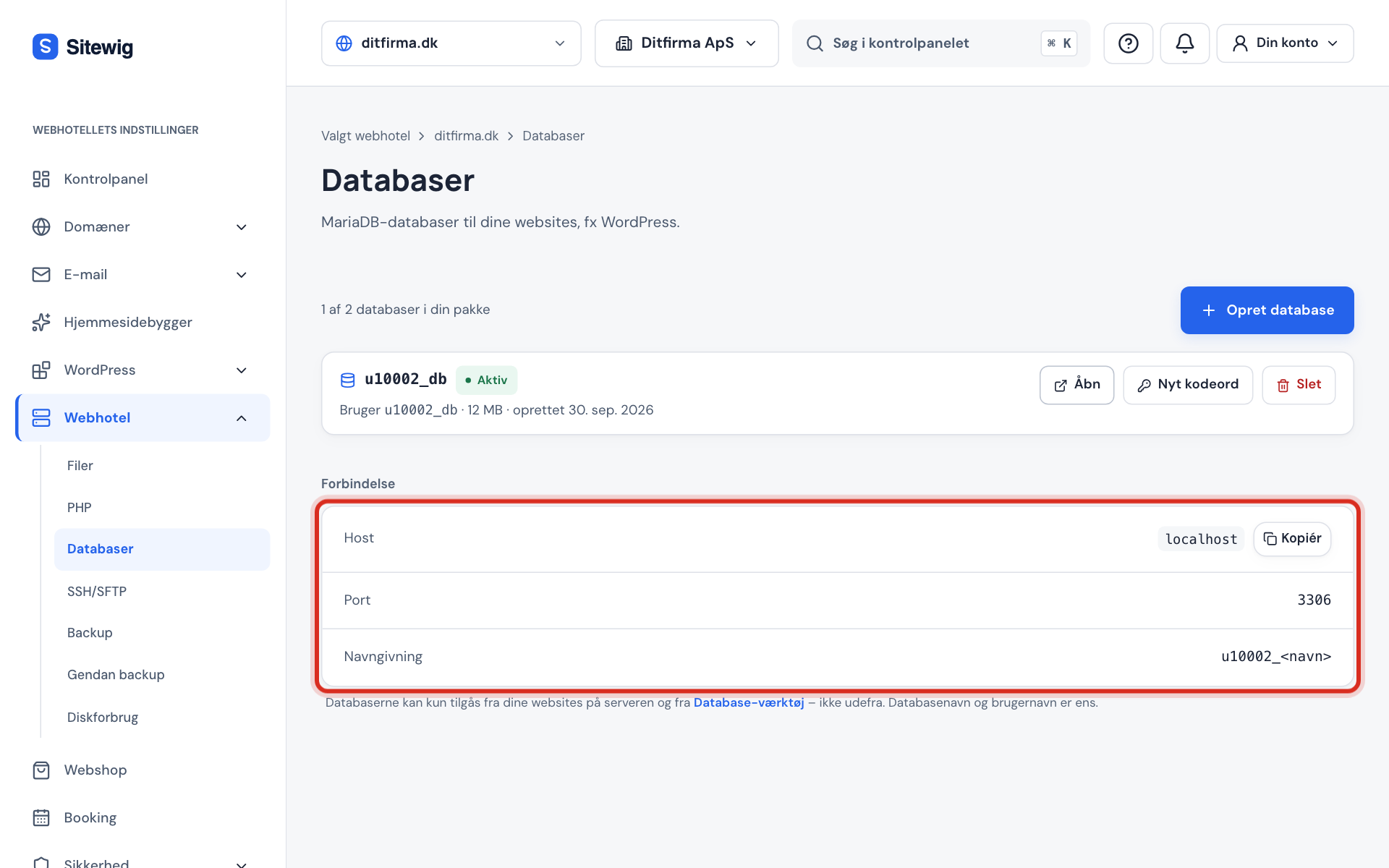
Connection at the bottom of the Databases page Step 4: Use your saved password
The password is not shown in the control panel. Use the one you copied when the database was created. If you have lost it, create a new one – see Reset the password for your database.
Enter the values in WordPress
WordPress stores the connection in the wp-config.php file in the website's folder. Open the file with the File manager or an SFTP program and edit the four lines.
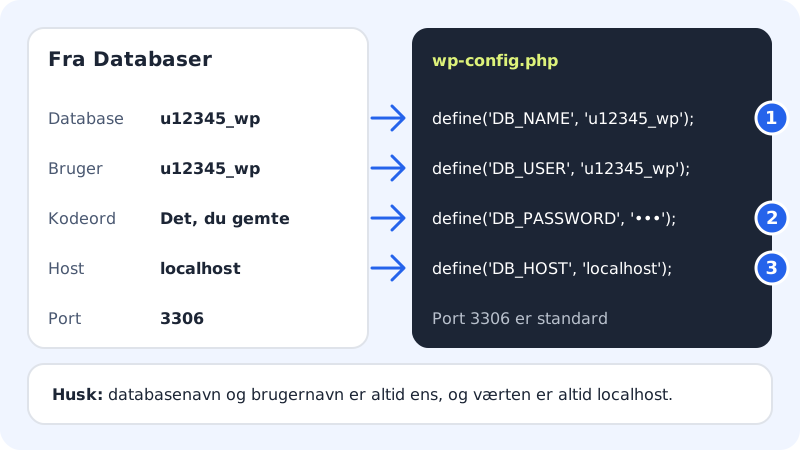
wp-config.php
- DB_NAME
u12345_wp- DB_USER
u12345_wp- DB_PASSWORD
- Your saved password
- DB_HOST
localhost- DB_CHARSET
utf8mb4
Save the file and reload your website. If you get an error, see Fix database errors in WordPress.
Use the values in your own PHP script
The PHP extensions mysqli and pdo_mysql are installed on all web hosting accounts, so you can use whichever method you prefer.
- PDO: use the DSN
mysql:host=localhost;dbname=u12345_wp;charset=utf8mb4together with the username and password. - mysqli: call
new mysqli('localhost', 'u12345_wp', $password, 'u12345_wp').
Frequently asked questions
Do I need to enter port 3306?
Normally not. Both WordPress and PHP use 3306 by default. If your program requires a port number, enter 3306.
Can I use my domain or the server's IP address as the host?
No. The database only accepts connections from localhost. If you use a domain name or an IP address, you will typically get the error Access denied or Can't connect.
What does "max. 20 connections" mean?
It is the highest number of simultaneous connections the database user may have. Ordinary websites only use a few at a time. If you hit the limit, it is usually down to a plugin or script that doesn't close its connections.
Can I connect from my own computer?
No, the database is closed to outside access. Find out what you can do instead in Can I connect to the database from my own computer?