A domain expires if it isn't renewed, e.g. because the renewal has been cancelled or an invoice is unpaid. The website and email on the domain then stop working. The good news: Sitewig keeps the setup for 30 days, and during that time the domain can usually be restored.
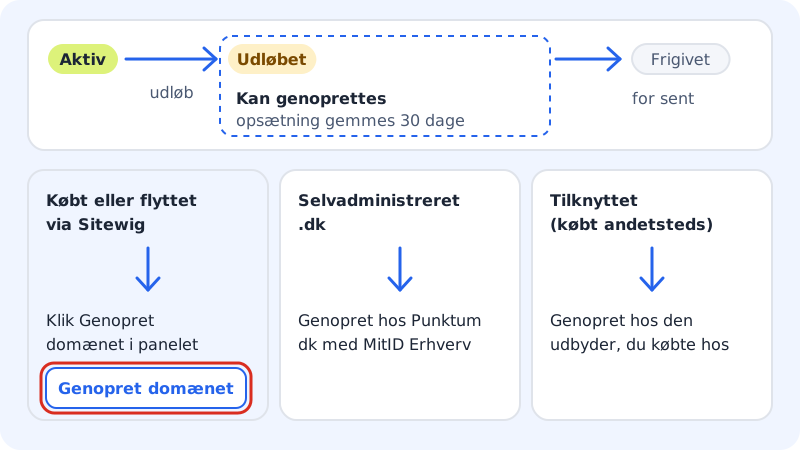
How to tell that the domain has expired
- Under Domains → My domains the domain shows the status Expired.
- On the domain page you see the message The domain has expired. If it can be restored, there's also a box titled Restore the domain.
After 30 days the domain is Released. It disappears from the list, and others can register it.
Restore a domain that was bought or moved via Sitewig
Step 1: Open the domain
Go to Domains → My domains and click the expired domain.
Step 2: Click Restore the domain
Click Restore the domain in the box of the same name. The button is only visible to owners and administrators on the customer account.
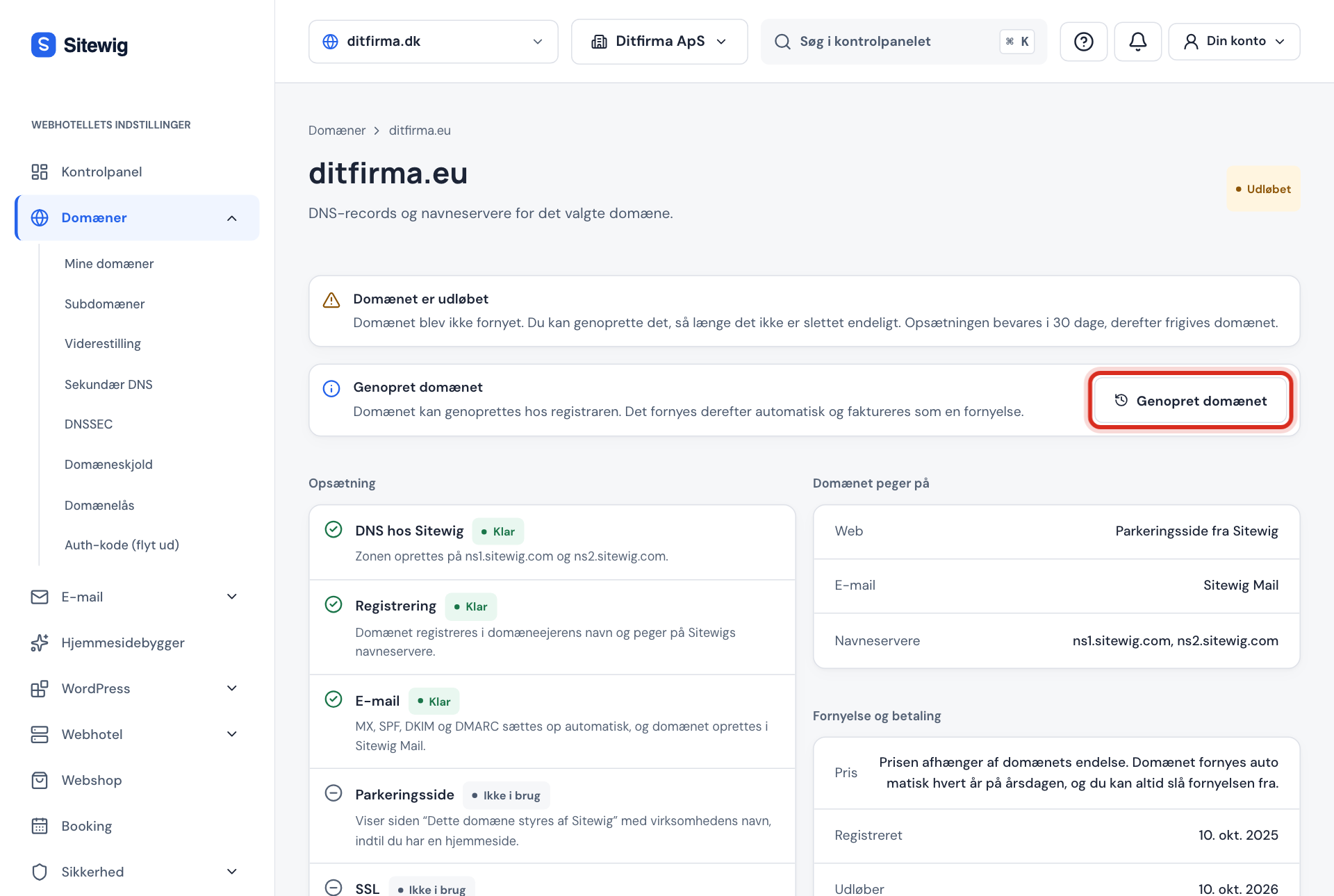
Restore the domain as long as it hasn't been released Step 3: The domain is set up again
You'll see the message The domain has been restored. Sitewig registers the domain again with the registry and sets up DNS, email, website and SSL as before. The status goes through Registering and Setting up to Active.
Step 4: Renewal starts again
The restored domain renews automatically again. The year that was missed is invoiced as an ordinary renewal of the domain.
Self-managed .dk domain
If the domain is a self-managed .dk domain, Sitewig can't restore it for you. When you click Restore the domain, we instead show the instructions Restore the domain at Punktum dk:
- Sign in to Punktum dk's self-service with MitID Erhverv for the business's CVR number.
- Choose the domain and choose to restore it.
- Sitewig checks automatically when the domain is active again.
Punktum dk charges its own fee for restoring the domain. See the difference between reseller-managed and self-managed (in Danish).
Linked domain (bought elsewhere)
If you bought the domain from another provider and have only linked it to Sitewig, that provider has to renew or restore it. Sign in with the provider and renew the domain there. Once it's active again and the name servers still point to ns1.sitewig.com and ns2.sitewig.com, the website and mail work again at Sitewig.
Frequently asked questions
How long do I have to restore the domain?
Sitewig keeps the setup for 30 days after the expiry date. The domain can be restored as long as it hasn't been permanently deleted at the registry. So don't leave it until the last minute.
Why can't I see the Restore the domain button?
Either the domain has already been released, it's linked from another provider, or you're not an owner or administrator on the customer account.
Will my emails come back?
The domain's setup at Sitewig, including DNS records and the Sitewig Mail setup, is kept for 30 days. If you restore the domain before then, you'll receive mail as before. Mail sent to you while the domain had expired may have been rejected by the sender and will need to be sent again.