Error 404 means the server responds, but can't find the page the address points to. The first question is therefore: does it apply to the whole domain or just a single page?
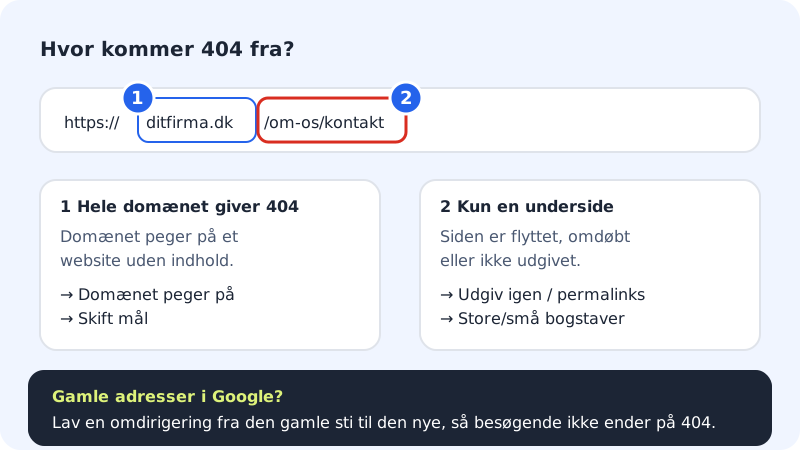
The whole domain gives 404
Step 1: Check what the domain points to
Go to Domains → My domains and click the domain. In the The domain points to card, under Web, you can see what the domain shows.
Step 2: Choose the right target
If the domain points to a website with no content or to the wrong page, press Change target. Choose Website at Sitewig and the right website, or the external service you use. Press Save. The change is out within a few minutes.
Step 3: Does the website have a start page?
If you use the hosting with your own files, there must be an
index.htmlorindex.phpdirectly in the website'spublicfolder.
A single page gives 404
Step 1: Website builder: publish again
If you've added, renamed or moved a page in the website builder, the change isn't visible until you press Publish and then Publish now. Also check that the link in the menu uses the page's new address.
Step 2: WordPress: save permalinks again
Log in to WordPress and go to Settings → Permalinks. Press Save changes without changing anything. This resets WordPress's own rules for subpages. The web server already passes all unknown addresses on to WordPress's
index.php, so you don't need to make rules in.htaccess– nginx doesn't read that file.Step 3: Your own files: check name and location
File names on the server are case-sensitive:
Kontakt.htmlandkontakt.htmlare two different files. Also check that the file is in the folder the address points to.
Old addresses from Google or old links
If you've moved or renamed pages, Google and other sites may still link to the old addresses. Send visitors on to the new page:
- WordPress: Use a redirect plugin and create a 301 redirect from the old path to the new one.
- Your own files with PHP: Do the redirect in PHP, e.g.
header('Location: /ny-side', true, 301);in a file at the old address. Rules in.htaccessdon't work, because Sitewig uses the nginx web server. - A whole domain: If an old domain should send everyone on to a new one, use Domains → Redirect. See Redirect your domain.
Frequently asked questions
Can I make my own 404 page?
Yes, in WordPress via your theme or a plugin. If you use your own PHP files, the web server sends unknown addresses to your index.php, so you can show your own error page from there (remember http_response_code(404);). The ErrorDocument 404 line in .htaccess doesn't work, because nginx doesn't read the file.
The front page works with www but not without, or the other way round. Why?
Then only one of them points to your website. Check the The domain points to card. If you use a different DNS provider, both @ and www must point to Sitewig.