If you have several domains, e.g. yourcompany.net alongside yourcompany.com, you can send visitors on to your real website. The redirect only applies to the website. Email on the domain is not affected.
Set up a redirect
Step 1: Choose the domain
Choose the domain to be redirected at the top of the left-hand menu. Go to Domains → Redirect.
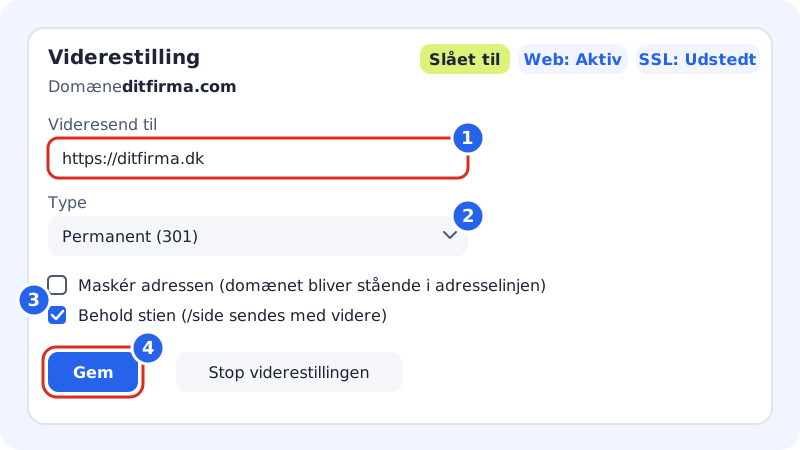
Redirect in four steps Step 2: Enter the destination address
Enter the address in Redirect to. It must start with
https://(orhttp://), e.g.https://yourcompany.com.Step 3: Choose Type
- Permanent (301): for a lasting move. Search engines transfer the domain's ranking to the new address. Choose this if in doubt.
- Temporary (302): for a short-term campaign or maintenance.
Step 4: Optionally choose Keep the path or Mask the address
See the difference below. You can only turn on one of them at a time.
Step 5: Save
Tap Save. At the top you will see On and two badges: Web and SSL. When both show Active and Issued, the redirect works, including on
https://.
Keep the path or mask the address?
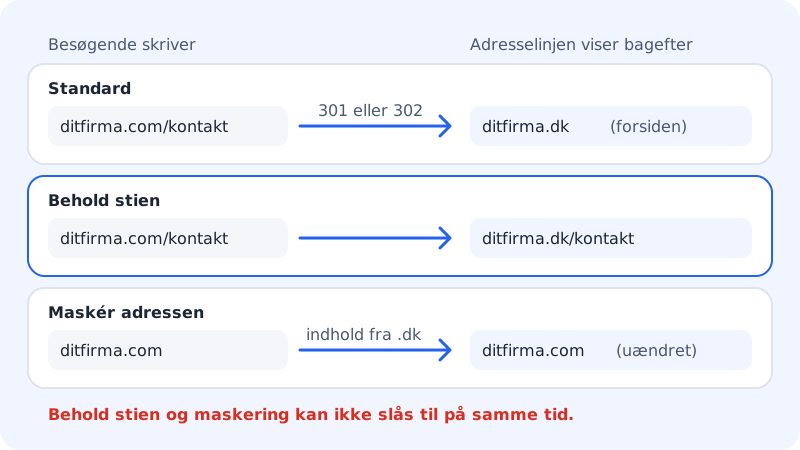
| Option | Visitors to yourcompany.net/contact end up at … |
|---|---|
| Neither | https://yourcompany.com (the front page) |
| Keep the path (/page is passed on) | https://yourcompany.com/contact |
| Mask the address (the domain stays in the address bar) | The content from yourcompany.com, but the address bar still shows yourcompany.net |
Stop the redirect
Tap Stop the redirect and confirm with Remove. The domain then shows Sitewig's parking page. If it should show a website, choose a new target under Change target on the domain page.
Frequently asked questions
Why do I get the message Enter an address that starts with http:// or https://?
The destination address must be a full address. Enter, for example, https://yourcompany.com rather than yourcompany.com.
Why does the page say that masking and keep path cannot be used at the same time?
The two options are mutually exclusive. When you turn one on, the other is turned off automatically.
Can I redirect a subdomain?
Yes. Create the subdomain under Domains → Subdomains and choose Address (redirect) in Points to. See Create subdomains.
Does my email still work on the redirected domain?
Yes. The redirect only changes the website. Email is controlled by MX records – see MX records.