If an email has been deleted and emptied from the bin, you can still get it back from a nightly backup of the mailbox. A restore always puts emails alongside what's already there – your current emails are never overwritten.
Restore emails
Step 1: Open the Restore emails card
Go to Web hosting → Backup and scroll down to the Restore emails card.
Step 2: Choose a mailbox
Under Mailbox, choose the mailbox the emails were in. The list shows the backups we have, with Time and Size. Press Refresh list if you can't see the latest ones.
Step 3: Choose a backup
Choose a backup from before the emails were deleted, and press Restore.
Step 4: Choose where the emails should go
You have two options:
- To the "Restored …" folder in the same mailbox: your current emails stay where they are, and the restored ones are put in a new folder alongside.
- To another, empty mailbox: the whole mailbox is restored with the original folder names. Create a new mailbox first under Email.
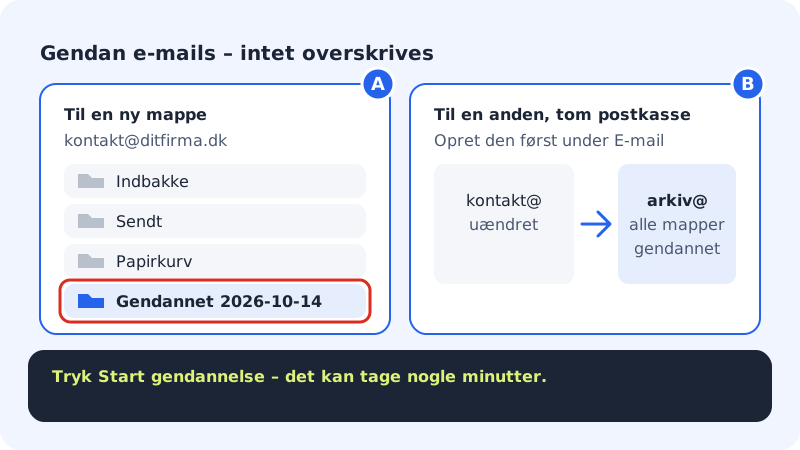
Choose a new folder or an empty mailbox – nothing is overwritten Step 5: Start the restore
Press Start restore. It can take a few minutes. Follow the status under Restores: Queued, In progress and Done.
Step 6: Find the emails
Open webmail or your email app. If you chose a folder, the emails are in a new folder called Restored plus the backup's date, e.g.
Restored 2026-10-14. If you can't see the folder in your email app, check that the folder is subscribed, or restart the app.
Email app (IMAP)
- Host name
mail.sitewig.com- Port
993- Security
- SSL/TLS
- Username
- Your full email address
Frequently asked questions
How far back can I go?
Mailbox backups are kept for up to 30 days. The Restore emails card shows exactly how many days your mailbox is kept.
Can I restore a single email?
You restore the whole mailbox from a particular night into a new folder. You can then move the emails you need back to the Inbox and delete the rest of the folder.
Does the restore overwrite emails I've received since?
No. Both methods put the emails alongside. Nothing in your current mailbox is changed or deleted.