Short answer: yes. You don't need to turn anything on in the control panel or write rules in .htaccess. As soon as your domain has an active SSL certificate, our web server answers every http:// visit with a permanent redirect (status code 301) to the same address with https://. Search engines understand a 301 as "the page has moved for good" and transfer its ranking to the https address.
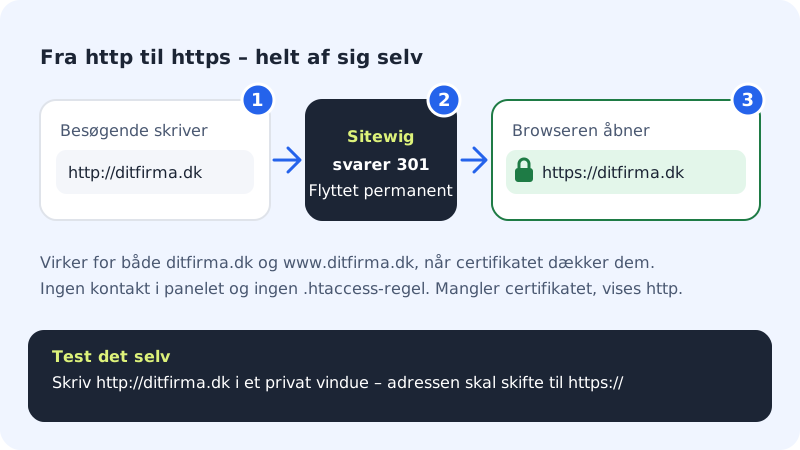
When does it happen?
- The certificate is active: all http visits are sent on to https, including for
wwwif the certificate coverswww. - The certificate isn't ready yet: the site is temporarily shown over ordinary http so that it doesn't go down. Once the certificate has been issued, the redirect switches on by itself.
You can see whether the certificate is ready under Domains → your domain → SSL. If it says SSL active, the redirect is active too.
Test the redirect
Step 1: Open the http address
Type
http://yourcompany.com(with your own domain) in the address bar in a private browser window, so the browser doesn't remember an old version.Step 2: Check the address bar
The address should change to
https://yourcompany.com, and there should be a padlock or a secure-connection icon.Step 3: Try www too
Repeat with
http://www.yourcompany.com. If it only works withoutwww,wwwprobably points somewhere other than the domain itself. See Troubleshooting: the SSL certificate isn't being issued.
Fix mixed content warnings
If the browser shows a warning even though the address starts with https://, the cause is almost always mixed content: the page loads images, fonts or scripts from an http:// address. The server can't fix that for you, because the addresses are in your own code or database.

- WordPress: Go to Settings → General in WordPress and make sure that both WordPress Address and Site Address begin with
https://. You can fix old links in posts with a search-and-replace plugin. - Your own code: Search for
http://in your templates and CSS files, and change it tohttps://or relative paths. - The website builder: Pages made in the builder already use https. If you've inserted your own code or embedded content from other services, check the addresses in it.
Frequently asked questions
Can I turn the redirect off?
No, there's no switch for it. All sites with an active certificate are shown over https, because it's the safest for your visitors and best for search engines.
Does Sitewig set HSTS on my website?
No, not today. We don't send the HSTS header on customers' websites. The redirect from http to https works regardless.
The page goes in circles with "too many redirects" – what do I do?
Remove your own https rules from .htaccess and turn off https features in any security or cache plugins. Then clear the browser's cache and try again.