If you are cancelling everything with your old provider, the domain needs to come to Sitewig too. For .com, .eu and most other endings this is done with an auth code (also called an EPP code or transfer code). The code proves that you are allowed to move the domain. Moving .dk domains is handled manually: contact support and we'll help you.
Before you start
- The domain must be unlocked at the old provider. This is typically called domain lock, transfer lock or registrar lock.
- The domain normally must not have been registered or moved within the last 60 days. See Can my domain be moved?
- It is a good idea to create your mailboxes at Sitewig straight away once the transfer has been ordered. When it has completed, the domain points to Sitewig, and so does the email.
Transfer the domain
Step 1: Get the auth code from the old provider
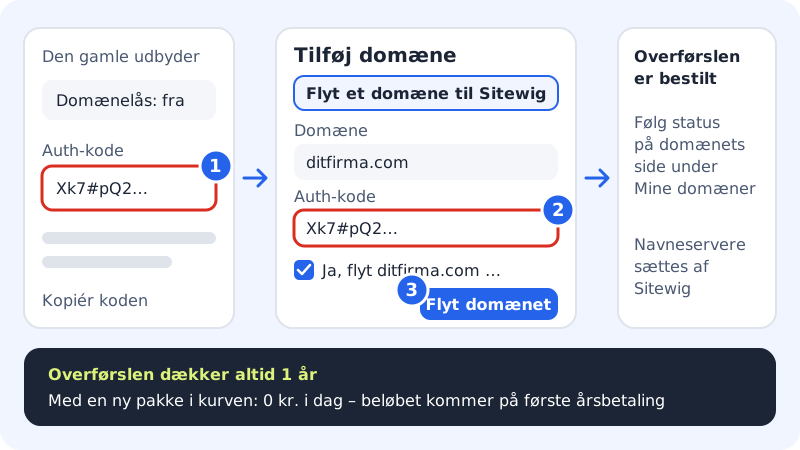
Sign in with the provider the domain is with now. Switch off the domain lock, and ask for the auth code. Some providers show it straight away, others send it by email. See What is an auth code, and where do I find it?
Step 2: Open the transfer at Sitewig
If you are using the moving guide, tap Start the transfer in step 1. Otherwise go to Domains → My domains, tap Add domain and choose the Move a domain to Sitewig tab.
Step 3: Enter the domain and auth code
Enter the domain in the Domain field, for example
yourcompany.com. Paste the code into the Auth code field. You get the code from the provider the domain is with now. Copy it exactly, with no spaces before or after.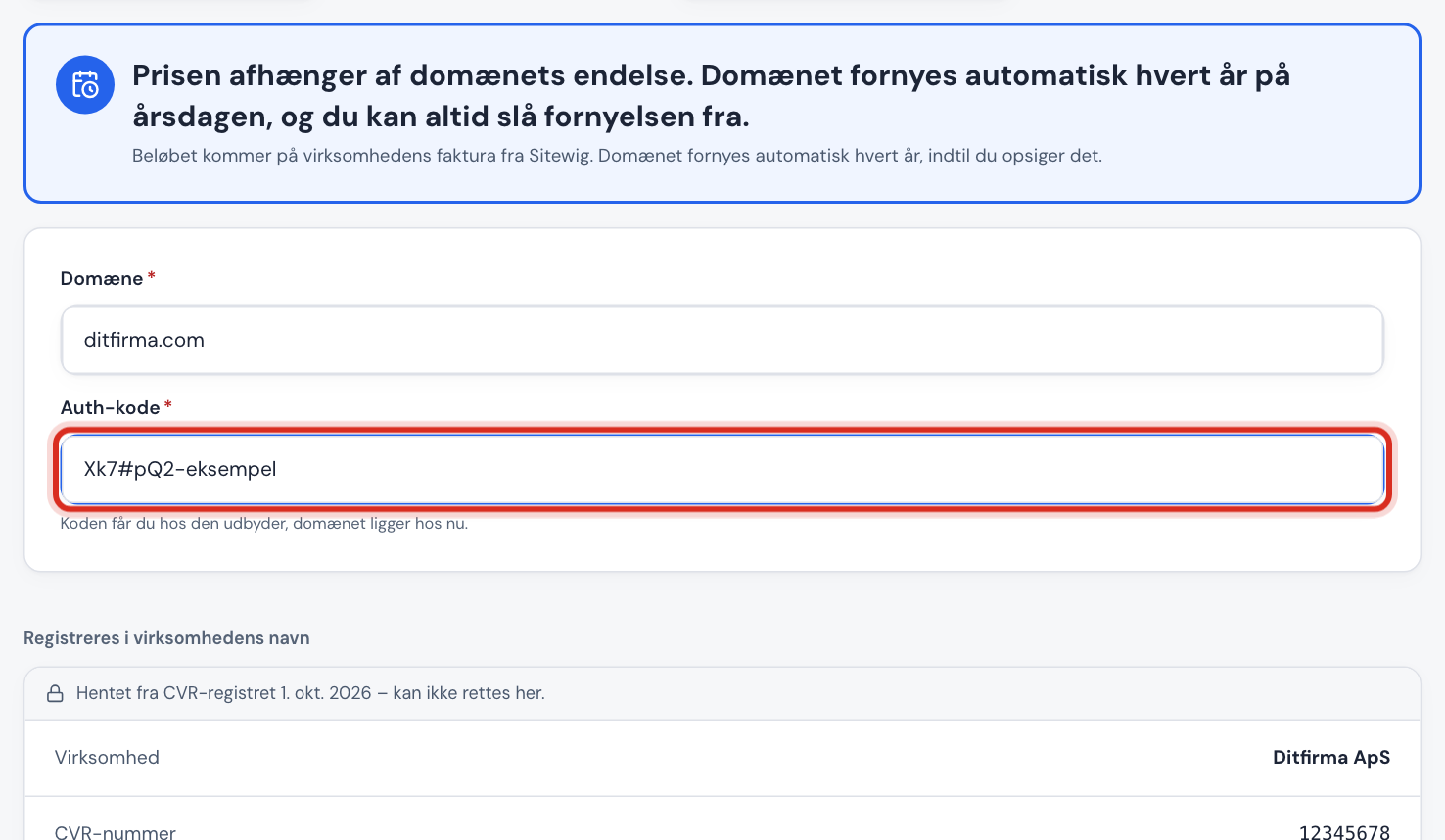
Step 4: Choose what the domain should point to
Under What should the domain point to?, choose what the domain should show when the transfer is finished. You can always change it later.
Step 5: Confirm, and move the domain
Tick Yes, move yourcompany.com to Sitewig and tap Move the domain. The transfer is free. Afterwards you will see The transfer has been ordered.
Step 6: Follow the status
The transfer is now running at the registry. You can follow it on the domain's page under Domains → My domains. When it has completed, Sitewig sets the name servers itself – you do not need to do anything.
Price and payment
The transfer is free for every extension, whether you order it with a new plan or in the control panel. You only pay the domain's yearly renewal at our cost price with no mark-up, for example .com £8.49/yr no VAT charged and .eu £4.49/yr no VAT charged. See all prices in What does it cost to move a domain?
- Renewal: The domain renews automatically every year until you cancel it.
- Domains are never free. The move itself at Sitewig is free, but the domain's annual renewal is paid for as normal.
Frequently asked questions
How long is the auth code valid?
That is decided by the old provider. Many codes are valid for a few days or weeks. If the code has expired or is wrong, the transfer is rejected, so get a new one and try again.
Does Sitewig store my auth code?
The code is only used for the transfer itself. It is not stored in the basket.
Do I lose the time I have paid for at the old provider?
With generic endings such as .com, the registry normally adds the new year on top of the remaining period. That is decided by the registry, not by Sitewig.
What if the transfer is rejected?
See The move was rejected. What now?. Typical causes are a wrong code, an active domain lock or the 60-day rule.