A domain has two sides: where it is registered (who you pay the renewal to) and where DNS is managed (which name servers answer). When you move to Sitewig, DNS always has to come to us. The registration you can choose to keep or bring along.
The two options
Attach or transfer
- Attach (keep the registration)
- The domain stays registered with the old provider. You only change name servers to Sitewig at the end. Free at Sitewig, no code and no waiting.
- Transfer the domain
- Sitewig takes over the registration and the renewal. Requires an auth code from the current provider (.dk is moved manually, see below). Paid for in the basket.
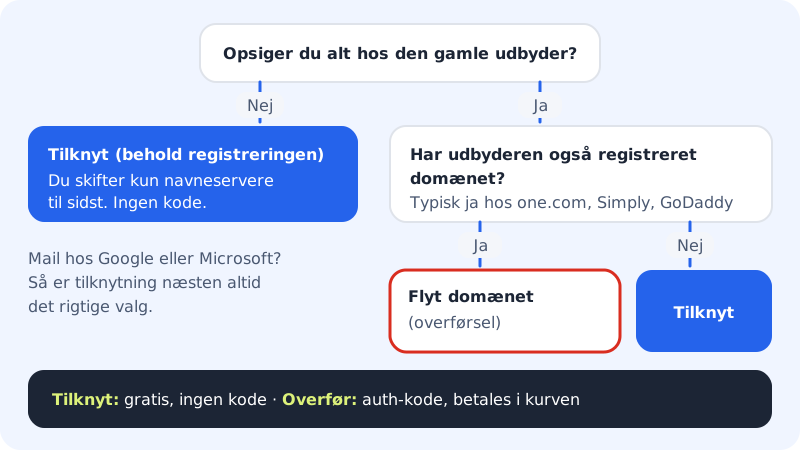
How to choose
- If you are keeping something with the old provider, for example because the website stays there for a while, attach. It is the quickest.
- If your email is with Google Workspace or Microsoft 365, the domain is almost always registered somewhere else. Then it is enough to attach and change name servers.
- If you are cancelling everything with one.com, Simply or GoDaddy, transfer. Those providers typically register the domain too, and if you cancel the subscription, the domain may disappear with it.
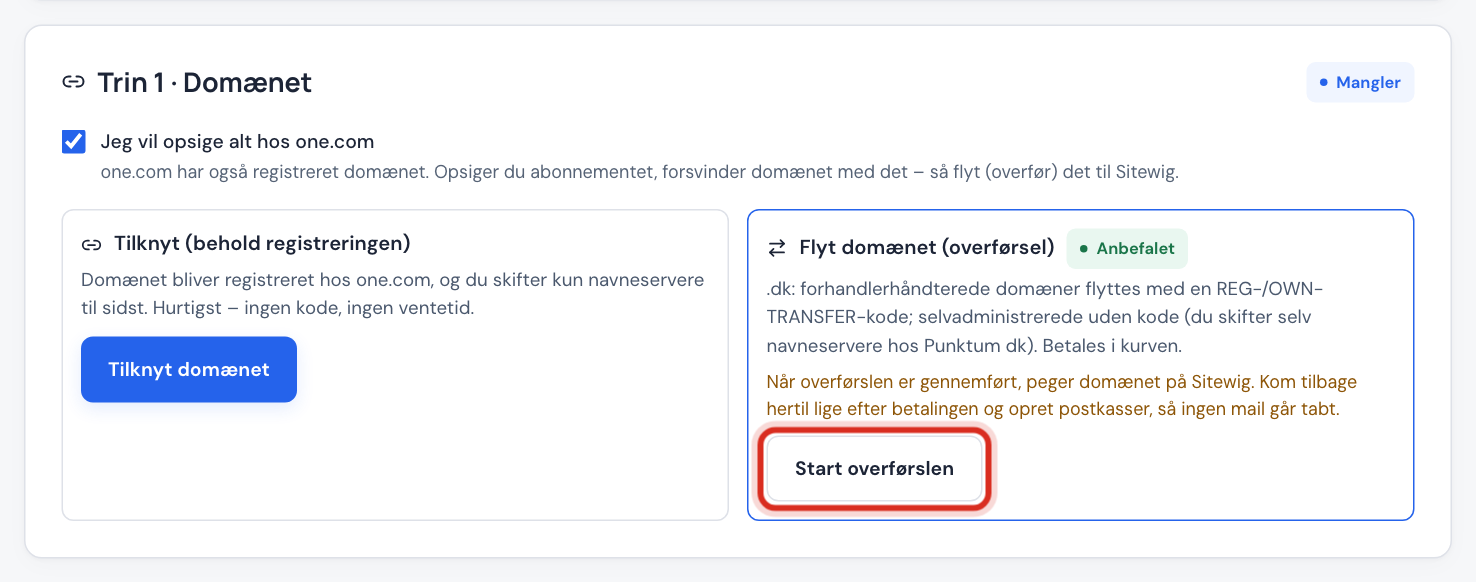
In the guide Domains → Move here, the tick box I want to cancel everything at … is ticked in advance when the provider is also the registrar. The guide then marks Transfer the domain as Recommended. If you remove the tick, Attach is recommended instead.
Attach the domain
Step 1: Open step 1 of the guide
Go to Domains → Move here, enter the domain, and tap Check the domain.
Step 2: Tap Attach the domain
In the Attach (keep the registration) card, tap Attach the domain. The domain is created at Sitewig with email going to Sitewig. If the guide found a website, the domain is pointed to the same server from the start, so nothing changes at the switch.
Step 3: Continue with the mailboxes
The guide now says that the domain is attached and that nothing changes for your visitors until you change name servers in step 5.
Transfer the domain
In the Transfer the domain card, tap Start the transfer. You go to Add domain with the Move a domain to Sitewig tab and the domain filled in. The rest is in Transfer your domain with an auth code. Moving .dk domains is handled manually: contact support and we'll help you.
Frequently asked questions
Can I attach now and transfer later?
Yes. Many people choose to attach during the move itself and transfer the domain when it is nearing renewal with the old provider.
What does it cost to attach?
It costs nothing at Sitewig. You carry on paying the renewal where the domain is registered.
What does "This domain is already in use at Sitewig" mean?
The domain is attached to another Sitewig account. Contact support if the domain is yours.