An auth code is a secret code that belongs to your domain only. It proves that you are allowed to move the domain from one provider to another. Without it, no one – not even Sitewig – can take over the registration. Think of it as a key that fits only one domain.
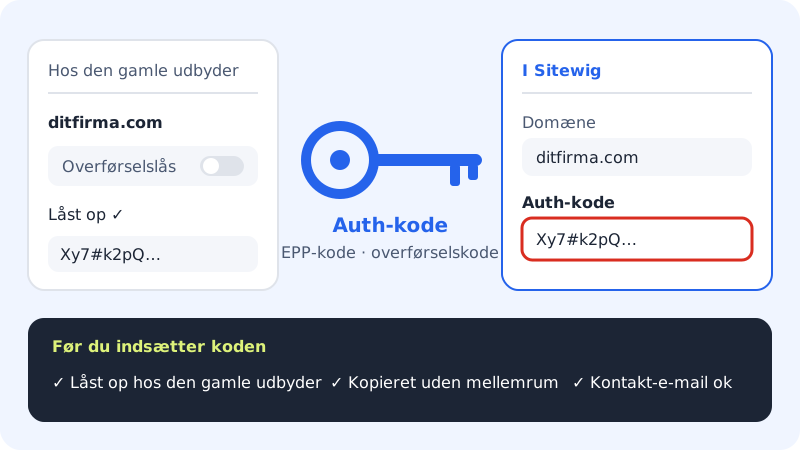
Other names for the same code
Providers call it different things. It is the same code whether it says:
- Auth code or authcode (the term Sitewig uses)
- EPP code
- Transfer code or authorisation code
- Transfer key
Some country extensions have their own format – see the section on country extensions further down.
How to get the code
Step 1: Log in to your current provider
Go to the control panel at the provider where the domain is today. Find your domains, and open the settings for the domain you want to move.
Step 2: Unlock the domain
Find the transfer lock setting (often called domain lock, transfer lock or registrar lock), and turn it off. If the domain is locked, the registry rejects the transfer even if the code is correct.
Step 3: Get the auth code
Find the button to show or request the auth code. Some providers show it immediately, others send it to the domain owner's email. If you cannot find it, ask the provider's support – they are obliged to give it to the domain owner.
Step 4: Paste the code at Sitewig
At Sitewig, go to Domains → My domains → Add domain, choose the Transfer a domain to Sitewig tab, and paste the code into the Auth code field. Read the full guide in How to move your domain to Sitewig.
Checklist before you paste the code
- Is the domain unlocked at the current provider?
- Has the code been copied in full and without spaces?
- Is the code new? Some providers let the code expire after a few days, and a new code makes the old one invalid.
- Is the contact email on the domain correct? The old provider may send an approval request there.
Country extensions can work differently
Some country extensions have their own transfer rules and code formats. Moving .dk domains is handled manually: contact support and we'll help you. If your domain has a country extension, your current provider can tell you which rules apply to it.
Frequently asked questions
Can Sitewig get the code for me?
No. The code is only given to the domain owner by the provider where the domain is today. This is a security rule that protects you against others moving your domain.
Sitewig says the code is missing or wrong. What do I do?
If you see Enter the auth code (transfer code) from the current provider., the field is empty. If the registry rejects the code later, get a new code from the old provider, and order the transfer again. See The transfer was rejected – what now?
Does Sitewig store my auth code?
Only while the transfer is in progress. The code is kept on the server, is not shown again in the control panel and is deleted when the transfer is complete.
I want to move a domain away from Sitewig. Where do I find the code?
In the control panel under Domains → Auth code (transfer out). Read Move your domain away from Sitewig.