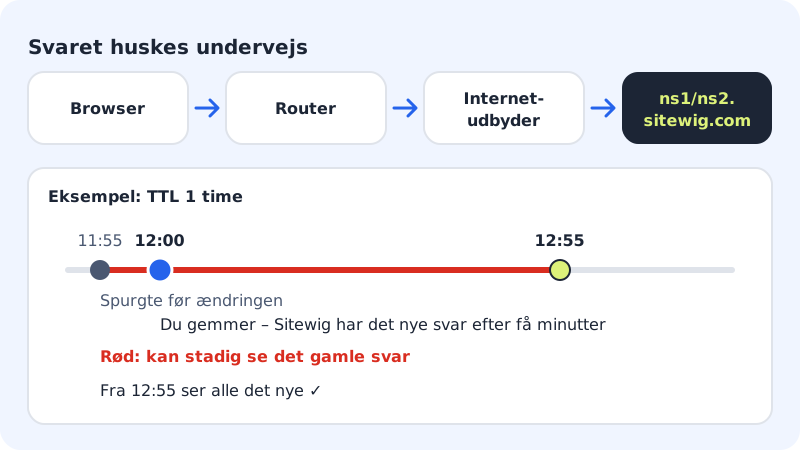
When you save a DNS change at Sitewig, it reaches our name servers within a few minutes. Even so, it can take longer before everyone sees it. The reason is TTL (time to live): the time others may remember the old answer before they ask again.
How long does it take?
| Change | Typical waiting time |
|---|---|
| New record on a name that did not exist before | A few minutes |
| Changed or deleted record | A few minutes + up to the old TTL (default 1 hour) |
| New target with Change target | A few minutes + up to the old TTL |
| New name servers at the registrar | Up to 24 hours. Sitewig checks automatically every hour |
Name server changes take longest because the registry for the extension (e.g. .dk or .com) also has a waiting time, which neither you nor Sitewig can change.
Choose a TTL
You choose the TTL in the Add record or Edit DNS record panel. The options are 10 minutes, 30 minutes, 1 hour, 4 hours, 12 hours and 24 hours. The default is 1 hour, which suits most people. In the DNS table, TTL is shown in seconds, e.g. 3600 s for 1 hour.
Still seeing the old page?
Step 1: Clear your own cache
Reload the page with a hard refresh, try a private window, or close and reopen the browser.
Step 2: Try another network
Turn off wifi on your phone and use mobile data. If it works there, only your own network is remembering the old answer. Restart the router if need be.
Step 3: Wait out the old TTL
If the old TTL was 1 hour, wait an hour from the change. For name server changes it can take up to 24 hours.
Step 4: Check the status at Sitewig
Open the domain under Domains → My domains. The banner at the top and the Timeline card show whether anything is missing. See Troubleshooting.
Frequently asked questions
Can Sitewig make it faster?
Our name servers have the change after a few minutes. The rest depends on how long others are allowed to remember the old answer – which is why lowering the TTL well in advance helps.
Why does it work for me but not for my colleague?
You are using different networks or devices that asked at different times. Once the TTL has expired, everyone sees the same thing.
When should I contact support?
If more than 24 hours have passed after a name server change, or more than the old TTL after a record change, and the banner on the domain page still shows an error.