A subdomain is an extra name in front of your domain, for example shop.yourcompany.com, blog.yourcompany.com or app.yourcompany.com. It costs nothing extra, and you can have up to 100 subdomains per domain.
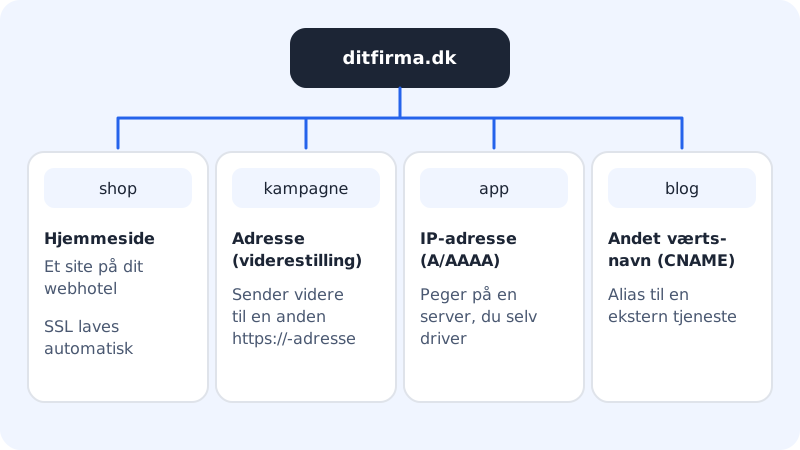
What can a subdomain point to?
| Points to | Use it when … |
|---|---|
| Address (redirect) | visitors should be sent on to another website, for example a campaign page |
| Website | the subdomain should show one of the sites on your web hosting. SSL is set up automatically |
| IP address (A/AAAA) | you have your own server |
| Other host name (CNAME) | an external service has given you a host name |
Create a subdomain
Step 1: Choose the domain
Choose the domain at the top of the left-hand menu, and go to Domains → Subdomains. The page shows which domain you are working on.
Step 2: Enter the name
Enter the name in Name, for example
shop. Use only lower-case letters, digits and hyphens – at most 63 characters.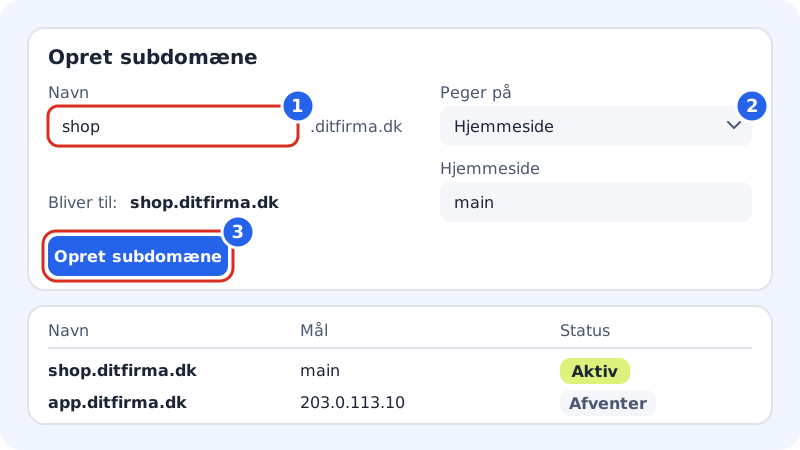
Create a subdomain in three steps Step 3: Choose what it points to
Choose in Points to, and fill in the field that appears:
- Address (redirect): enter the address in Redirect to (with
https://), and choose Permanent (301) or Temporary (302). See Redirect your domain for an explanation of masking and keep the path. - Website: choose the site.
- IP address (A/AAAA): enter the IPv4 address and, if needed, the IPv6 address (optional).
- Other host name (CNAME): enter the host name, for example
app.example.com.
- Address (redirect): enter the address in Redirect to (with
Step 4: Check and create
Below the fields it says Will become: shop.yourcompany.com. If that is correct, press Create subdomain.
Step 5: Follow the status
The subdomain appears in the list with the status Pending until it has been set up, and then Active. If something goes wrong, the message is shown below the status.
Delete a subdomain
Press the bin icon next to the subdomain in the list, and confirm with Remove in the Delete subdomain window. The subdomain stops working immediately.
When it does not work
| Message | What to do |
|---|---|
| The subdomain already exists. | Choose another name, or delete the old one first. |
| DNS records already exist for shop.yourcompany.com. Delete them first. | You have previously created records on that name in the DNS section of the domain page. Delete them there, and try again. |
| This feature only applies to domains registered with Sitewig. | The domain must be connected to Sitewig and use Sitewig's name servers. See Change name servers to Sitewig. |
| You have no websites on this web hosting. | Create a site first, or choose another type in Points to. |
Frequently asked questions
What is the difference between a subdomain and a DNS record?
A subdomain created here sets everything up for you – including SSL and redirects. A record created with Add record is only the DNS answer itself. Use Subdomains if in doubt.
Can I create a wildcard subdomain (*.yourcompany.com)?
Not on the Subdomains page. You can create an A or CNAME record with the name * in the DNS section – see Add, edit and delete DNS records.
Can a subdomain show a separate site on my web hosting?
Yes. Create an extra website on your web hosting – it gets its own folder – and choose it under Website in Points to. The subdomain then gets its own SSL certificate automatically.