Agency mode is for people who build and run websites for others. You keep track of your clients' sites in folders, and when a site is finished, you hand it over to the client, with domains, email and subscription.
Client folders
Step 1: Create a folder
Go to Clients and tap New client folder. Enter the Client name and, if you like, Client email (optional) and a note. Tap Create.
Step 2: Put sites in the folder
Next to each site you can choose Move to folder. Sites without a folder appear under No folder.
Step 3: Archive when you're done
Tap Archive folder. The sites in the folder move to No folder: nothing is deleted, and your client notices nothing.
Hand a site over to the client
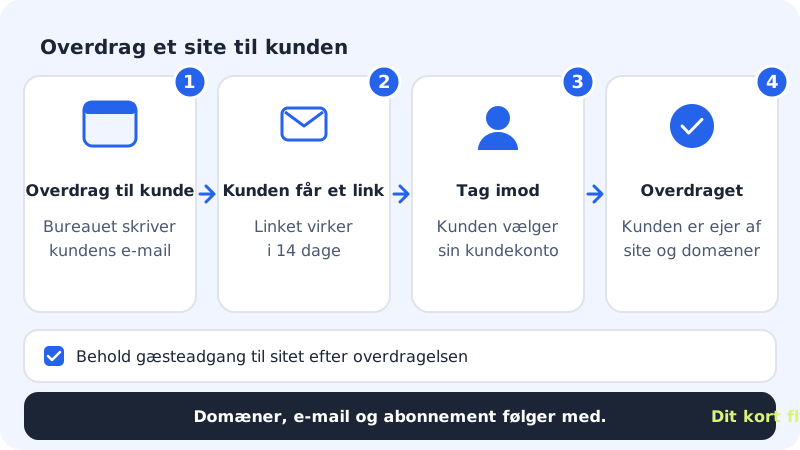
Step 1: Choose Hand over to client
Tap Hand over to client next to the site. The window explains what comes with it.
Step 2: Enter the client's email
Enter the address in Client email. If you want to carry on helping the client, tick Keep guest access to the site after the handover.
Step 3: Send the link
Tap Send link. We send the link to the client. You can also copy it and send it yourself. The handover now shows as Pending: you can take it back with Withdraw.
Step 4: The client accepts
The client opens the link, signs in (or creates an account) with the email address the link was sent to, and chooses under Receive into account which client account the site should go on. When the client taps Accept, the handover shows as Handed over.
Show your own logo
Under Your logo in the control panel you can show your agency's logo instead of Sitewig's, for yourself and for the clients you've handed sites over to.
- Enter the Agency name.
- Tap Upload logo. The logo must be PNG, JPEG or WebP and can be at most 48 KB.
- Tick Show my logo in the control panel. You need to upload a logo first.
Frequently asked questions
The client gets an error saying the link was sent to a different email. What do I do?
The client must sign in with exactly the address you entered in Client email. If it's the wrong address, tap Withdraw and send a new link to the right one.
Can the client remove my access afterwards?
Yes. If you've kept guest access, the client can always remove it under Guest users.
What happens to my client folders if I leave Max?
Agency mode is only included in Max. Consider handing finished sites over to your clients before you change plan.