Once you have ordered the transfer and paid, the domain appears in your control panel straight away. Here you can follow each step while the registry, the old provider and Sitewig do their part.
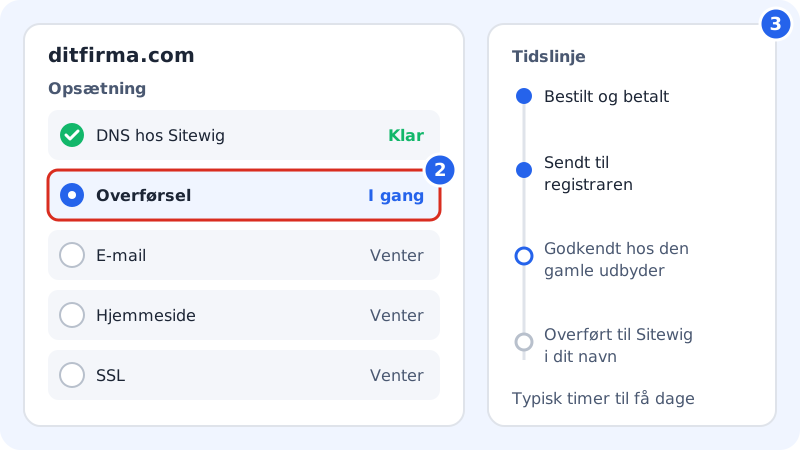
See the status
Step 1: Open the domain
Go to Domains → My domains and click the domain.
Step 2: Read the steps under Setup
Under Setup there are five steps. Each step has a status: Waiting, In progress, Pending, Ready or Failed.
The steps are:
- DNS at Sitewig: The DNS zone is created on Sitewig's name servers.
- Transfer: The registry and the old provider move the domain to Sitewig.
- Email: Email is set up according to your choice, e.g. Sitewig Mail.
- Website or Parking page: What the domain should show.
- SSL: Issued once the domain points to Sitewig's name servers.
Step 3: Follow the timeline
Under Timeline the events are listed in order, e.g. that the transfer has been sent to the registrar and that the domain has been transferred to Sitewig and registered in your name.
Step 4: Approve the transfer if you are asked to
Some providers send an email to the domain's owner asking them to approve the transfer. If you approve it straight away, it goes faster.
How long does it take?
It depends on the extension and on the old provider:
- .com, .net, .eu and similar: typically from a few hours to around five days. If the old provider approves the transfer quickly, it goes faster.
- .dk: Moving .dk domains is handled manually: contact support and we'll help you.
- Once the name servers have changed, it can take up to 24 hours before the change has taken effect everywhere on the internet.
The times are based on experience and are not a guarantee – some providers use the whole period the registry gives them.
If something goes wrong
If a step fails, you see a yellow or red box at the top of the domain's page with an explanation. If it says We're working on it, Sitewig tries again by itself. If it says The domain could not be set up, you can fix the cause and tap Try again. Read The transfer was rejected – what now?
Frequently asked questions
Do I need to do anything while the transfer is in progress?
Usually not – apart from approving the transfer if the old provider asks you to.
When is the transfer completely finished?
When the Transfer step says Ready and the timeline shows that the domain has been transferred to Sitewig and registered in your name. The rest of the steps become ready shortly afterwards.