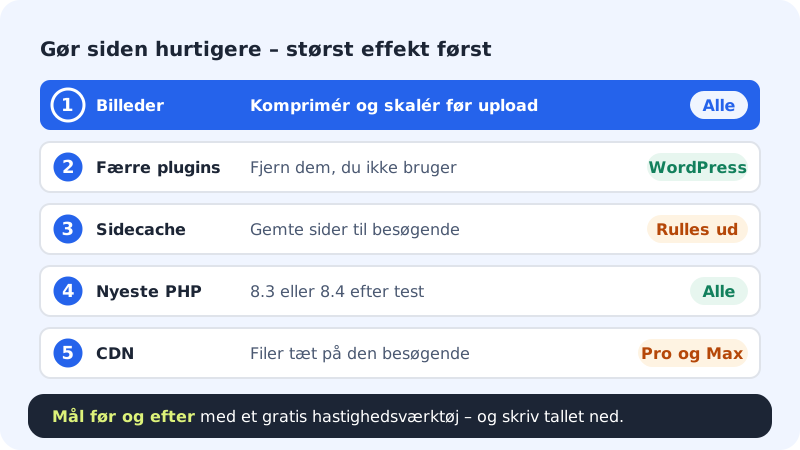
A slow website costs you visitors and Google rankings. The good news is that the biggest improvements are usually ones you can make yourself in a few minutes. Take the steps in order – the first typically gives the most.
Step 1: Measure before you change anything
Use a free speed tool online, e.g. Google's PageSpeed Insights, and write down the score for both mobile and desktop. That way you can see whether your changes work. The control panel has no speed measurement of its own.
Step 2: Make the images smaller
Large images are the most common cause of slow pages. Scale images to the size they're displayed at, rarely more than 2000 pixels wide, and save photos as JPG or WebP rather than PNG.
Step 3: Tidy up WordPress
Every plugin can make the site slower. Delete the plugins you don't use and avoid having several that do the same thing. Use a lightweight theme.
Step 4: Use the latest PHP version
Newer PHP versions are faster. Go to Web hosting → PHP and choose 8.3 or 8.4 if your website supports it. Test the site afterwards and switch back if anything breaks.
Step 5: Turn on page cache, if you have it
If your WordPress site has the Page cache card on the website's page under WordPress → Overview, press Turn on page cache. It stores finished pages so visitors who aren't signed in get them faster. The cache is cleared automatically when you publish or change content, and you can press Clear cache yourself.
Step 6: Use a CDN, if your plan has it
A CDN delivers your files from servers close to the visitor. It's included with Pro and Business. Under Web hosting → CDN you turn it on and off per domain, and you can press Clear CDN cache after major changes.
Still slow?
Measure again and write to support with the address of the slow page and your results before and after. Then we can see whether something on the server is dragging it down.
Frequently asked questions
The site is fast for me, but slow for others. Why?
Your browser has already downloaded the images and files. New visitors have to download everything. Test in a private window to see the site as a new visitor does.
Does my site get slower when lots of people visit?
It can happen during big campaigns. Page cache helps a lot, because the server doesn't have to build the page from scratch for every visitor.
What can I do if I use the website builder?
The images matter most. Upload images at a sensible size and remove sections with heavy videos or lots of images you don't need. Publish again afterwards.