Your web hosting plan covers most things. If you need a little extra, you can buy individual things on top, without changing plan. Other things, such as more storage or more websites, only come with a bigger plan.
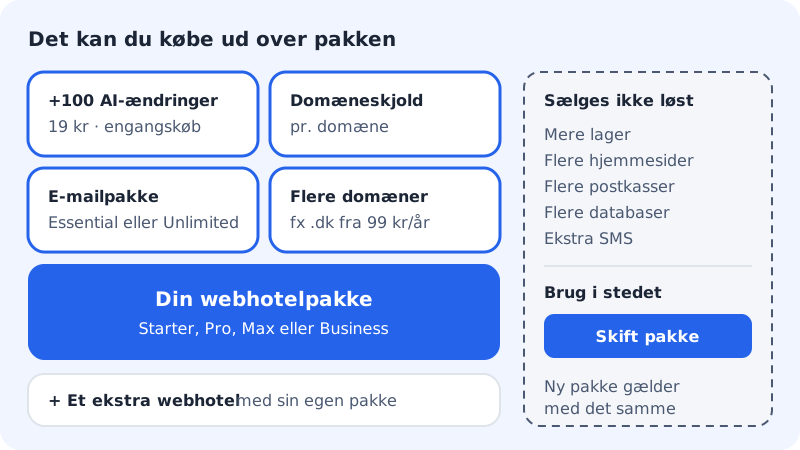
Add-ons available today
| Add-on | What you get | Price | Where to buy it |
|---|---|---|---|
| Larger mailbox 25 GB | One mailbox gets 25 GB, which does not count towards the web hosting's shared storage | Monthly, per mailbox | The control panel under Email → Mailboxes, in the mailbox's menu |
| +100 AI edits | 100 extra AI edits with NinaAI | One-off purchase | In the app builder and the website builder, when you use AI |
| Email plan | Essential or Unlimited for a domain | Monthly price, paid per year | The control panel or the pricing page |
| More domains | E.g. .dk £8.49/yr no VAT charged, .com £9.49/yr no VAT charged and .eu £6.49/yr no VAT charged for the first year | Cost price with no mark-up, per domain | The pricing page or Domains in the control panel |
| An extra web hosting | A new web hosting with its own plan | The plan's price | The pricing page |
The prices are for Denmark and exclude VAT. If you are a private customer in Denmark, 25% VAT is added.
Larger mailbox 25 GB
Each mailbox on a web hosting has a fixed size that follows the plan: 3 GB in Starter, 5 GB in Pro and 10 GB in Business. If one mailbox needs more, you can give just that one 25 GB:
Step 1: Find the mailbox
Go to Email → Accounts in the control panel and open the menu next to the mailbox.
Step 2: Choose Upgrade mailbox
Choose Storage or Upgrade mailbox, and confirm the purchase of Larger mailbox 25 GB.
- The price applies per mailbox and is paid together with the plan's yearly subscription. If you are in the 3 free months, the add-on is only charged on the first yearly invoice.
- The mailbox's space does not count towards the web hosting's shared storage.
- You can cancel the add-on from the end of the period if the mailbox can fit in the plan's ordinary size.
- Max already has 25 GB per mailbox, so the add-on does not exist there.
- The add-on is also available for mailboxes in Mail Essential, but not in Mail Unlimited.
See your add-ons
Everything you have bought is under My products in the menu at the top of the control panel:
- Subscriptions shows web hosting plans and email plans with the name of the web hosting.
- Domains shows your domains grouped by web hosting.
- Add-ons shows, for example, Domain Shield with status and renewal date. The section only appears when you have an add-on.
The Buy more button in the top right corner of the page leads to the pricing page.
What you cannot buy separately
The good thing about upgrading is that you pay proportionally for the rest of the period, and that the new plan also gives you more of everything else. From Starter to Pro, for example, you get 35 GB more space, 4 more websites and domains, 10 mailboxes instead of 3 and an online shop.
Frequently asked questions
Does +100 AI edits renew automatically?
No. It is a one-off purchase that is valid for the rest of the month of purchase and all of the following month. No subscription is started.
Can I cancel an add-on?
Larger mailbox 25 GB can be cancelled from the end of the period if the mailbox can fit in the plan's ordinary size. Add-ons that come with your plan follow the plan and cannot be cancelled separately.
I need many more websites than Max gives. What do I do?
Buy an extra web hosting, or contact us and we will find a solution. See The plan applies per web hosting.