An alias is an extra address that delivers to a mailbox you already have. If someone writes to invoices@yourcompany.com, the email lands in, say, contact@yourcompany.com. The alias has no password, no login and no storage of its own.
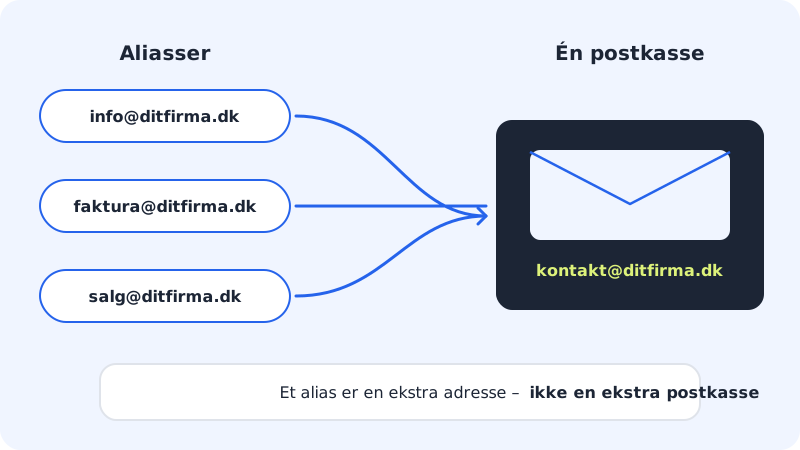
Alias, forwarding or mailbox?
| Feature | Alias | Forwarding | Mailbox |
|---|---|---|---|
| Own inbox and login | No | - | Yes |
| Uses storage | No | Only if a copy is kept | Yes |
| Counts towards the number of accounts in your plan | No | - | Yes |
| Typical use | info@, invoices@, jobs@ | Pass email on to another address | One person or one department |
Forwarding is set up on an existing mailbox – see Forward email and set an auto-reply.
Create an alias
Step 1: Open Email aliases
Go to Email → Email aliases in the menu. You can also click Aliases in the row of tabs on Email → Mailboxes.
Step 2: Enter the alias address
Enter the full new address in Alias address, e.g.
invoices@yourcompany.com. The domain must be one of your domains with Sitewig Mail.Step 3: Choose the mailbox
In Deliver to mailbox, choose which mailbox the email should land in.
Step 4: Save
Click Save. The alias now appears in the list together with the mailbox it delivers to.
Step 5: Test the alias
Send an email to the alias address from another address and check that it lands in the chosen mailbox.
Delete an alias
Click Delete next to the alias in the list and confirm Delete the alias?. After that, email to the address is no longer delivered, unless you have switched on catch-all.
Catch-all: receive email sent to any unknown address
Under Email → Catch-all you can choose a Catch-all mailbox. It then receives all email sent to addresses on the domain that do not exist, including typos such as contct@yourcompany.com.
What you cannot do yet
- An alias to an address at another provider (e.g. a personal Gmail) requires the address to be confirmed first. You can also use forwarding from a mailbox.
- The Email aliases and Catch-all pages may be switched off for some accounts. If you do not see them in the menu, contact support.
Frequently asked questions
Can I send email from an alias?
An alias is for receiving only. Replies are sent from the mailbox that the alias delivers to.
Do aliases cost extra?
No. Aliases do not count towards the number of mailboxes your plan includes.
Can an alias deliver to several mailboxes?
Not from the control panel at the moment. You choose one mailbox per alias.