A digital product is a file that the customer downloads after purchase, such as an e-book, a knitting pattern, a template or an audio track. You upload the file once, and Sitewig automatically sends a download link to every customer who pays. Digital products are included from Pro.
Create a digital product
Step 1: Create the product
Go to Online shop → Products and click New product. Choose Product type Digital product (download).
Step 2: Fill in the details and save
Enter the Name, Price and Description – it helps to say which file format the customer will get. Tick Visible in the shop and click Save.
Step 3: Upload the file
Open the product again. Under Files to download, click Upload file and choose the file. You can upload several files to the same product – the customer gets a link for each one.
Step 4: Test the purchase
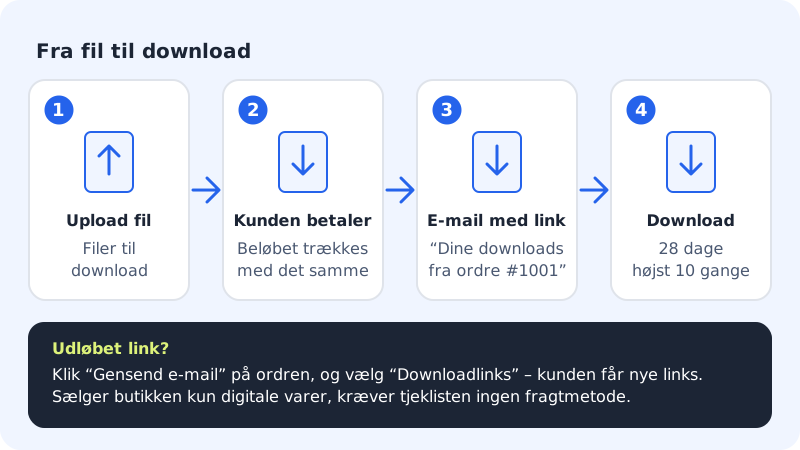
Buy the product yourself while the shop is in test mode. You'll receive the email Your downloads from order #… with the link.
How the download link works
- The link is emailed as soon as the order is paid.
- It works for 28 days and can be used at most 10 times.
- Payment is always taken immediately, even if you've turned on manual capture.
Digital and physical products
| Physical product | Digital product | |
|---|---|---|
| Shipping | The customer chooses a shipping method | No shipping |
| Stock | Can be managed with Track stock | Not needed |
| Delivery | You click Mark as shipped | The link is sent automatically |
| Payment | Can be reserved with manual capture | Always taken immediately |
If the shop only sells digital products, the Before the shop can open checklist doesn't require a shipping method.
Frequently asked questions
Can the customer withdraw from buying a digital product?
Consumers generally have a right of withdrawal, but the right can lapse for digital content once delivery has begun and the customer has accepted this. Describe your rules in your terms and conditions, and ask your adviser if you're unsure.
What happens when the link has been used 10 times?
The link stops working. Resend Download links from the order if the customer needs the file again.
Can I sell a digital and a physical product in the same order?
Yes. The customer chooses shipping for the physical products and receives the download link for the digital product by email once the order is paid.