When someone searches for "hairdresser near me" or "carpenter Bristol", Google typically shows a map of local businesses at the top. To be included, Google needs to be sure who you are and where you're based. That takes three things: consistent details everywhere, a Google Business Profile and good reviews.
Consistent details everywhere
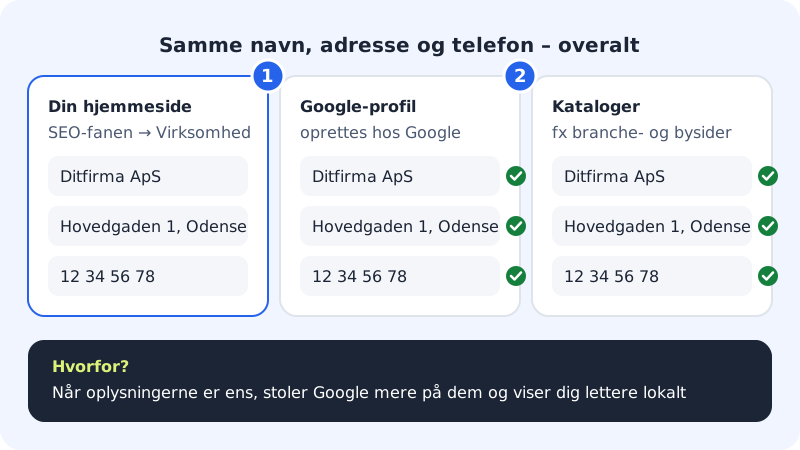
Use exactly the same name, address and phone number on your website, your Google profile and in directories. Small differences, such as "High Street 1" and "High St 1", can leave Google in doubt.
How to do it
Step 1: Fill in Business on your website
In the editor, go to the SEO tab and scroll down to Business (structured data). Press Add business details, and fill in Name, Phone, Address, Postcode, City and Country (e.g. GB). Write it exactly as it appears on your Google profile.
Step 2: Show the address and phone number on the page
Also write the address and phone number where visitors can see them, for example in a contact section or at the bottom of the page.
Step 3: Create your Google Business Profile
The profile is created with Google, not with Sitewig. It's free. Use the same details, and enter your website's address, e.g.
https://yourcompany.com, as the website.Step 4: Ask for reviews
Ask satisfied customers whether they'd write a review on Google. Reply to reviews, including the critical ones.
Step 5: Publish and check
Publish the website. Afterwards you can test your structured data with Google's Rich Results Test.
If you use Sitewig Booking
The booking system can send the customer one email after the visit with a link to your Google review page or your own page. The email is only sent to customers who agreed to it when they booked. You turn it on in the booking settings.
If you have an app built with AYAAI
AYAAI apps have a Visibility tab with a Google check and concrete tips, for example Create a Google Business Profile, Write your address and phone number on the page and Ask happy customers for a review.
Frequently asked questions
How long does it take to appear on Google Maps?
Google first has to verify your profile – often with a code sent by post, phone or video. After that, it can take a few weeks before you start to appear.
May I put reviews on my website?
Yes, as long as they're genuine and from real customers. Only write what the customer actually said, and ask permission to use their name.
Does it help to write the town name many times on the page?
No. Write naturally about where you work. Repetition can make the text worse for both readers and Google.