Your Sitewig mailbox also has a calendar and an address book. They sync using the open standards CalDAV (calendar) and CardDAV (contacts), so you can see and edit appointments and contacts on your phone, your computer and in webmail at the same time.
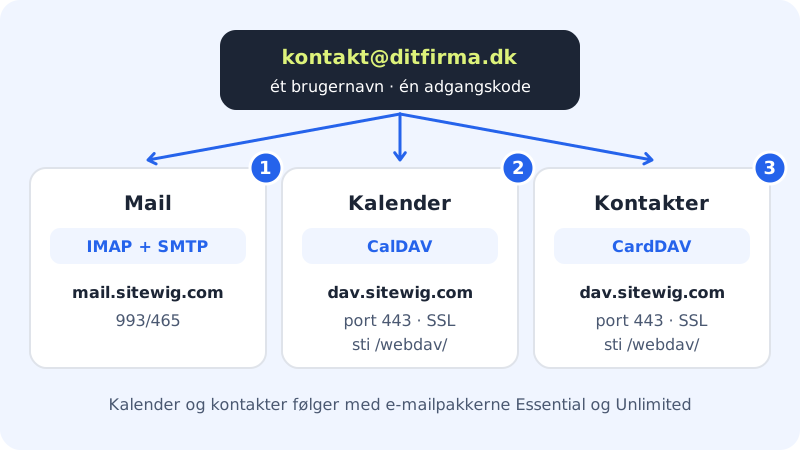
What you need
Calendar and contacts (CalDAV/CardDAV)
- Server
dav.sitewig.com- Port
443- SSL
- Yes
- Path
/webdav/- Full address (URL)
https://dav.sitewig.com/webdav/- Username
- Your full email address
- Password
- The mailbox password
iPhone and iPad
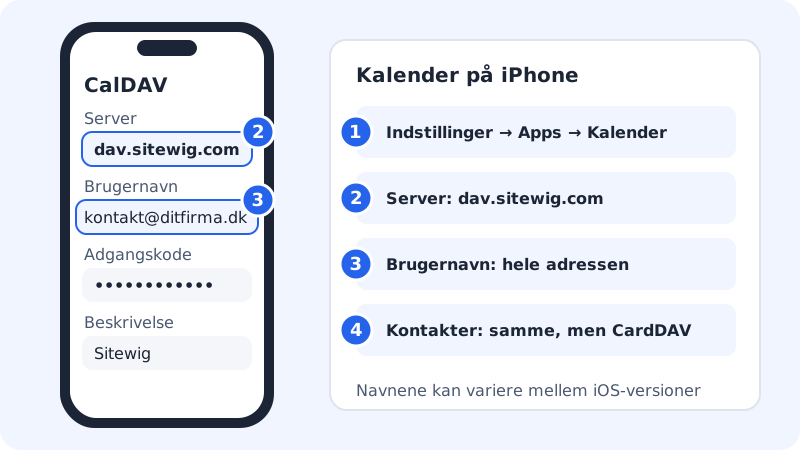
Step 1: Add a CalDAV account
Go to Settings → Apps → Calendar → Calendar Accounts → Add Account. Choose Other and then Add CalDAV Account. In older versions of iOS, the route is Settings → Calendar → Accounts.
Step 2: Fill in the server and login
Enter
dav.sitewig.comas the Server, your full email address as the User Name and the mailbox Password. Enter, for example, "Sitewig" as the Description, and tap Next.Step 3: Save
Tap Save. Your Sitewig calendars now appear in the Calendar app.
Step 4: Add the contacts
Do the same under Settings → Apps → Contacts → Accounts → Add Account → Other → Add CardDAV Account, with the same server and login.
Mac
- Open the Calendar app, and choose Calendar → Add Account in the menu bar.
- Choose Other CalDAV Account. Set Account Type to Manual.
- Enter the full email address as the username, the mailbox password and
dav.sitewig.comas the server address. Click Sign In. - You add contacts in the Contacts app under Contacts → Add Account → Other Contacts Account with the account type CardDAV and the same values.
Thunderbird
- Open the calendar and click New Calendar. Choose On the Network.
- Enter the full email address as the username and
https://dav.sitewig.com/webdav/as the location. Click Find Calendars. - Enter the mailbox password, select the calendars you want to see and click Subscribe.
- You add contacts in the address book with New Address Book → Add CardDAV Address Book and the same address and login.
Android
Android cannot sync calendars and contacts from anyone other than Google by itself. You need to install an app that supports CalDAV and CardDAV, for example the free open-source app DAVx⁵ from Google Play or F-Droid.
- Open the app and add an account with Login with URL and user name.
- Enter
https://dav.sitewig.com/webdav/as the URL, the full email address as the username and the mailbox password. - Choose which calendars and address books to sync. They then appear in your phone's own Calendar and Contacts apps.
Frequently asked questions
Is this the same as Exchange or "Mobile Sync"?
No. Sitewig uses CalDAV and CardDAV, which are supported directly by iPhone, iPad, Mac and Thunderbird, and by Android with an extra app. Exchange ActiveSync is not available with Sitewig, so Outlook cannot sync calendars and contacts.
Do I need a different password for the calendar?
No. The username and password are the same as for your mailbox. If you change the password in the control panel, you also need to update it in the calendar and contact accounts.
I only have web hosting without an email plan. Do I get calendar and contacts?
Calendar and contacts are part of the Essential and Unlimited email plans. Contact support if you are unsure what your plan includes.