Most people do not need any of this. Sitewig's name servers take care of DNS for you. But if you run your own name servers or want extra security, you will find the tools under Domains in the left-hand menu. Choose the domain at the top of the menu first.
Secondary DNS
With secondary DNS, Sitewig remains the primary: you edit records in the control panel as usual, and your own name servers fetch a copy of the zone and answer with the same data.
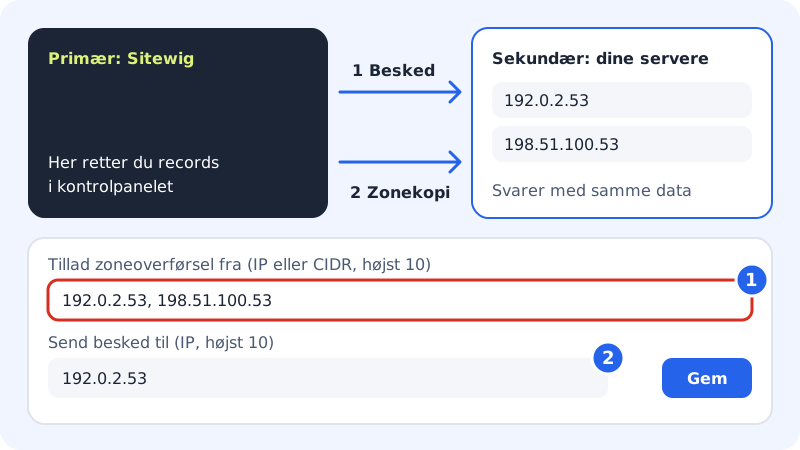
Step 1: Open Secondary DNS
Go to Domains → Secondary DNS. At the top you will see Primary name server and Our name servers, which you need when setting up your servers. Use the copy button next to each one.
Step 2: Allow zone transfer
Enter your servers' IP addresses in Allow zone transfer from (IP or CIDR, max. 10). Separate them with commas or line breaks.
Step 3: Choose who is notified
In Send notification to (IP, max. 10), enter the servers that should be notified when the zone changes, so that they fetch the new version straight away.
Step 4: Save
Tap Save. The text The change is on its way out to the name servers is shown until it has been completed.
DNSSEC
DNSSEC signs the domain's DNS answers so that no one along the way can forge them. It requires two things: the zone must be signed, and the registry for the extension must know your key via a DS record.
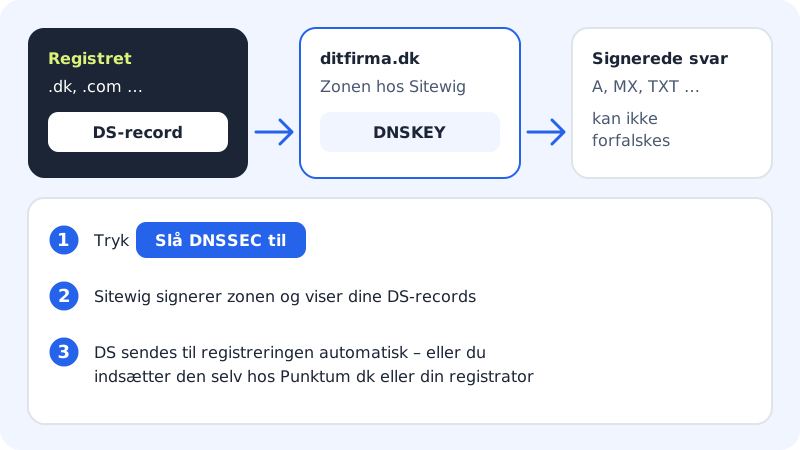
Step 1: Open DNSSEC
Go to Domains → DNSSEC.
Step 2: Turn on DNSSEC
Tap Turn on DNSSEC. The status changes from Off to Turning on and then Active. The DS records and Keys (DNSKEY) sections show the values with copy buttons once signing is ready.
Step 3: Get the DS record to the registry
If the domain is registered with Sitewig, we send the DS record ourselves – you can see the date under Sent to the registry. Otherwise the page shows You must add the DS records yourself:
- .dk domains: DS records for .dk domains must be entered at Punktum dk (the self-service portal with MitID).
- Domains registered elsewhere: enter the DS record at your registrar.
Until that has been done, the status shows Waiting for DS at registrar.
Your own name servers (e.g. Cloudflare)
If you want the whole domain's DNS with another provider, the domain's name servers must be changed to theirs. You do this on the Name servers card with the option Use own name servers. If you cannot use the card:
- If the domain is registered with Sitewig, contact support if you need to use other name servers.
- If the domain is registered elsewhere, change the name servers at that registrar.
If you only want one subdomain with another provider, you do not need to move the whole domain – use NS records, see Advanced records.
Frequently asked questions
Can I use secondary DNS and DNSSEC at the same time?
Yes. Your secondary servers fetch the signed records together with the rest of the zone.
Why does DNSSEC show Waiting for DS at registrar?
The zone is signed, but the registry does not yet know the DS record. Enter it at Punktum dk or your registrar as described above.
Why does the page show You have no domains yet?
The features only apply to domains connected to Sitewig. Choose the domain at the top of the menu, or connect it first – see Change name servers to Sitewig.