Every FTP program that supports SFTP or FTPS works with your Sitewig web hosting. Here are the settings you need, and what to do if your program only supports plain FTP.
Which protocol should I choose?
Sitewig offers two encrypted ways to transfer files. Plain, unencrypted FTP is turned off, because your password would otherwise be sent in clear text.
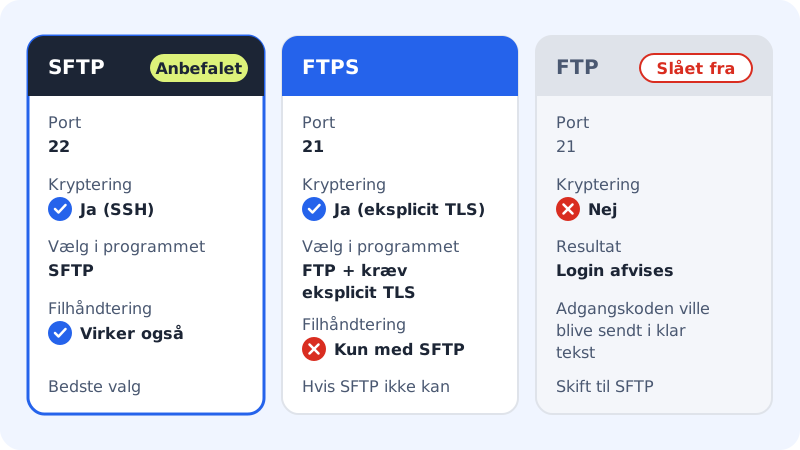
SFTP (recommended)
- Server
- The address next to Server under Web hosting → SSH/SFTP
- Port
22- User name
- Your FTP user name, such as
u12345 - Password
- The FTP user's password
FTPS (if your program doesn't support SFTP)
- Server
- The same address as above
- Port
21- Encryption
- Explicit TLS, must be required
- Transfer mode
- Passive (active mode is turned off)
- User name and password
- As above
Check which protocols your user has
Each FTP user has its own protocols. Go to Web hosting → SSH/SFTP and look under the user name. It says, for example, Whole account · SFTP + FTPS.
- If it says SFTP, you can use SFTP and the file manager in the browser.
- If it only says FTPS, you can only use FTPS on port 21.
The protocols are chosen when the user is created. If you're missing one, create a new FTP user with both protocols.
Cyberduck (Mac and Windows)
Step 1: New connection
Open Cyberduck and click Open Connection.
Step 2: Choose SFTP
Choose SFTP (SSH File Transfer Protocol) in the list at the top of the window.
Step 3: Fill in the fields
Enter the address from Server as the server,
22as the port, your FTP user name and the password.Step 4: Connect
Click Connect. The first time, Cyberduck asks whether you want to accept the server's key. Accept it, and choose to have it remembered if you like.
If you want to use FTPS in Cyberduck, choose FTP-SSL (Explicit AUTH TLS) and port 21.
WinSCP (Windows)
Step 1: New login
Open WinSCP. The login window appears straight away; if not, choose New Session.
Step 2: Choose SFTP
Set File protocol to SFTP.
Step 3: Fill in the fields and log in
Enter the address from Server under Host name,
22under Port number, and your FTP user name and password. Click Login, and accept the server's key the first time.
For FTPS in WinSCP, choose FTP as the protocol, TLS/SSL Explicit encryption under encryption, and port 21.
Frequently asked questions
My program says the server requires TLS. What does that mean?
You're trying to log in with plain FTP. Switch to SFTP on port 22, or choose FTP with explicit TLS required on port 21.
Can I use implicit FTPS on port 990?
No. Sitewig uses explicit TLS on port 21. Choose explicit in your program, or use SFTP.
Why does my user work in FileZilla but not in the file manager?
The file manager requires the user to have SFTP turned on. If it only has FTPS, create a new FTP user with SFTP. Older FTP users get access to the file manager the next time you reset their password.