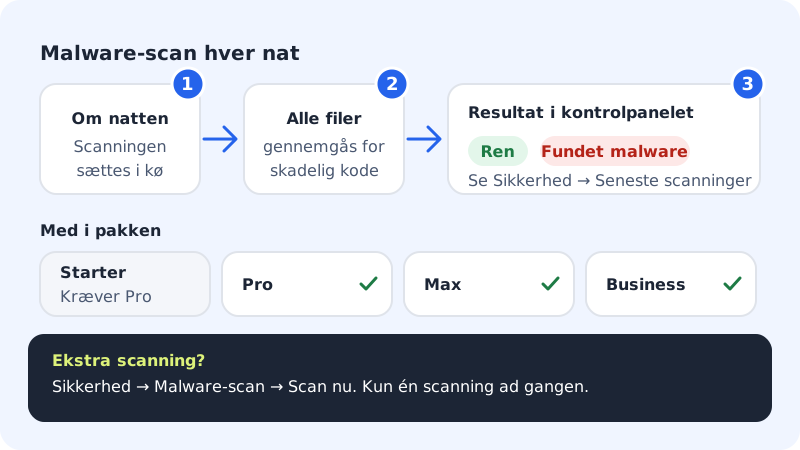
Malicious code typically gets in through an out-of-date plugin, a weak password or a file that's uploaded without being checked. With the malware scan we automatically go through all the files on your web hosting every night and show the result in the control panel, so you spot the problem before your visitors or Google do.
Who has the malware scan?
| Plan | Malware scan |
|---|---|
| Starter | Not included – the page shows Requires Pro |
| Pro | Included |
| Business | Included |
| Max | Included |
See the status and start a scan
Step 1: Open Malware scan
Click Security in the left-hand menu and choose Malware scan. Here you see the Scan schedule and Latest scan fields.
Step 2: Start an extra scan
Press Scan now if you want a scan straight away, for example after you've cleaned up or installed a new plugin. Only one scan can run at a time. If one is already running, you get the message A scan is already running.
Step 3: See the result
Go to Security → Security. The Malware scan row in the Overview card shows the latest result, and the Latest scans card shows the most recent scans with time and status: Clean means nothing was found, and Malware found means we found at least one suspicious file.
What do we scan?
- All the files in your web hosting: websites, WordPress installations, uploads and your own scripts.
- We use a well-known open-source virus scanner with up-to-date signatures.
- The scan only reads the files. It doesn't delete, change or move anything by itself.
Frequently asked questions
Do I get an email if malware is found?
You can't count on it today. Check the Security page regularly, especially after major changes to your website.
Can I scan a single website?
No, not from the control panel. Scan now always goes through the whole web hosting.
I have Starter. Can I add malware scan?
The malware scan comes with the Pro, Business and Max plans. Change plan under My products if you want it.