All payments to Sitewig go through our payment provider, Stripe. You enter your card details on Stripe's secure payment page, not at Sitewig.
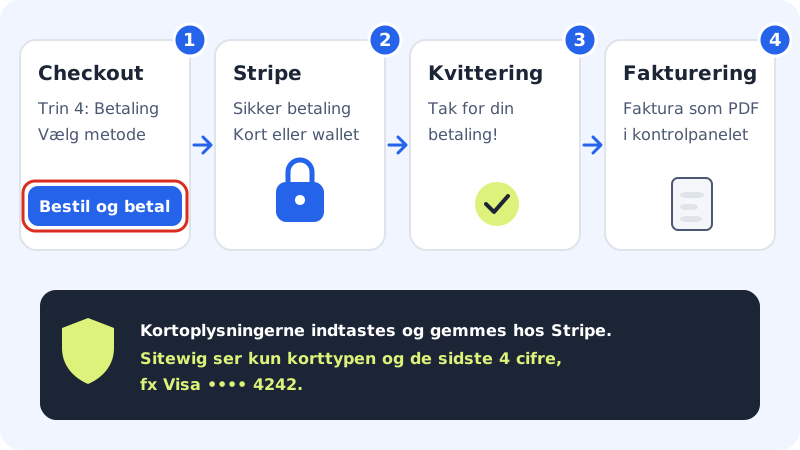
The methods at checkout
In the last step of checkout, Payment, you choose under Choose payment method between:
- Payment · Visa / Mastercard: payment card
- MobilePay: only shown to customers in Denmark
- Apple Pay
- Google Pay
When you tap Order and pay, Stripe's payment page opens. That page decides which methods you can finally pay with on your device and in your country. You can always use a payment card.
What does Sitewig store about my card?
The card number and security code are held only by Stripe. In the control panel you see at most the card type and the last four digits, e.g. Visa •••• 4242, and the expiry date. You add and remove cards in Stripe's portal, see Change or add a payment card.
Currency and language
You pay in your country's currency: kroner in Denmark, Swedish and Norwegian kroner in Sweden and Norway, euro in Germany, France and Ireland and pounds in the United Kingdom. Stripe's payment page is shown in the language your account uses.
Frequently asked questions
Can I pay by bank transfer or get an invoice with a payment deadline?
Not at the moment. Orders are paid straight away via Stripe, and renewals are charged automatically. If you do not have a payment card, write to support@sitewig.com before you order.
Can I pay for my Sitewig plan with MobilePay?
MobilePay appears as an option at checkout for Danish customers, but whether it can be used is decided on Stripe's payment page. Renewals are charged to a saved payment card, so a card is the safe solution for subscriptions.
I want to accept MobilePay in my own online shop. Is that the same?
No. The payment methods in this guide are the ones you use to pay Sitewig yourself. Payments from your own customers in the online shop go directly to your own Stripe account and are set up under Online shop → Payments & VAT.
Is it safe to pay?
Yes. The payment is made on Stripe's encrypted page, and your bank may ask you to approve the purchase in its app or with a code (3-D Secure).