Each web hosting account has its own PHP setup with fixed limits, so that one website can't use up the whole server. Most websites never notice the limits. Here you can see the values, and what to do if you run into them.
The limits
PHP settings on all web hosting accounts
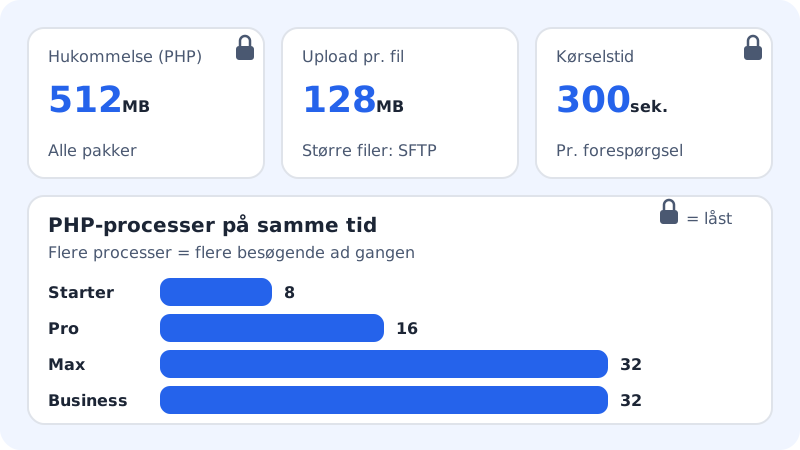
- memory_limit
512M(per PHP process, fixed)- upload_max_filesize
128M- post_max_size
128M- max_execution_time
300seconds (hard limit)- max_input_vars
3000- date.timezone
Europe/Copenhagen- display_errors
- Off (errors are written to
logs/php/error.log)
The number of PHP processes that can run at the same time depends on your plan. More processes mean that more visitors can get a response at once – this matters especially for online shops and busy WordPress sites.
| Plan | PHP processes at the same time | Memory per process |
|---|---|---|
| Starter | 8 | 512 MB |
| Pro | 16 | 512 MB |
| Business | 32 | 512 MB |
| Max | 32 | 512 MB |
Can I change php.ini?
Not at the moment. There is no php.ini editor in the control panel, and the limits above are set for the whole web hosting. Some values (e.g. memory, disabled functions and which folders PHP may read) are locked for security reasons and can never be overridden.
When you hit a limit
What does "Allowed memory size of … bytes exhausted" mean?
A script has used more than 512 MB of memory. This is almost always caused by a plugin or an import that loads too much at once. Update or replace the plugin, or split the import up. A bigger plan gives you more PHP processes, but not more memory per process.
I can't upload a large file in WordPress. What do I do?
Uploading through the browser is limited to 128 MB per file. Larger files, e.g. videos or backup archives, you upload with SFTP under Web hosting → SSH/SFTP, where the 128 MB per file limit doesn't apply.
My script stops after 5 minutes. Can it run for longer?
No. A single request can run for 300 seconds at most. Split the work into smaller chunks, e.g. with an import that continues from where it left off.
The site is slow when there are lots of visitors. Will a bigger plan help?
Yes, if all PHP processes are busy at the same time. Pro has twice as many as Starter, and Business and Max have four times as many. Also consider a caching plugin, so that fewer pages have to be built by PHP each time.
Can I choose the time zone myself?
The server's time zone is Europe/Copenhagen. In WordPress you can choose a different time zone under Settings → General, and in your own scripts you can set it with date_default_timezone_set().