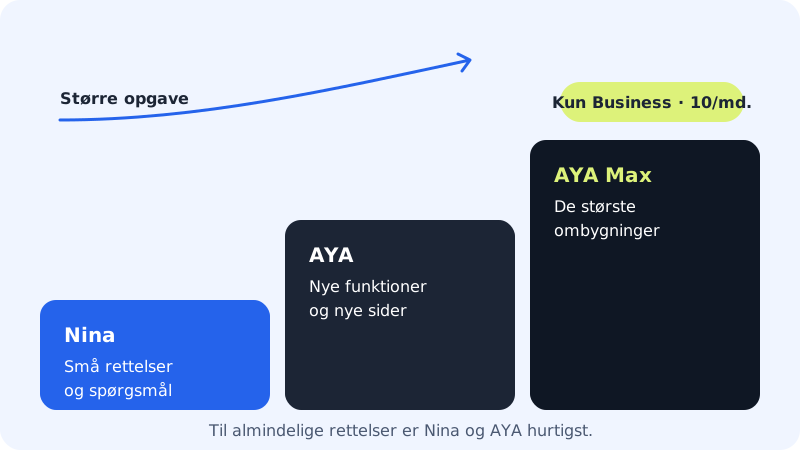
AYAAI Max is a more powerful build model behind AYAAI. It is intended for the biggest tasks in an app, for example when several pages and features need to be rebuilt at once, or when an ordinary AYAAI edit is not enough.
Who has AYAAI Max?
AYAAI Max is only included in the Max plan:
AYAAI Max by plan
- Free, Starter, Pro and Business
- Not included
- Max
- 10 AYAAI Max runs per month
The limit resets on the 1st of every month, just like your other AI limits. The +100 AI edits add-on does not give you more AYAAI Max runs.
When does AYAAI Max make sense?
- When you want to rebuild a large part of the app at once, for example a new members' area with sign-in, profile and overviews
- When a task touches many pages and features that need to work together
- When an ordinary AYAAI edit has tried several times without getting what you want
For ordinary fixes and new individual features, ordinary AYAAI is faster and better suited.
How to see your AYAAI Max runs
Step 1: Open the app builder
Go to the app builder (
/apps) via the App builder with its own CMS card on the Website builder page.Step 2: Find the row in the AI this month card
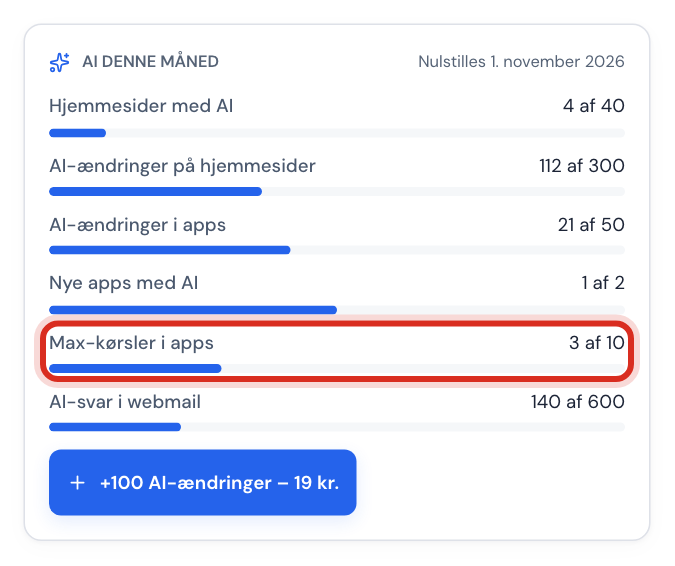
If you have Max, the AYAAI Max runs row (or Max runs in apps, if the names NinaAI and AYAAI are not switched on) appears in the AI this month card, for example 0 of 10. In other plans the row is not shown.
How an AYAAI Max run is counted
- An AYAAI Max run is counted when AYAAI builds from a plan you have approved with AYAAI Max. The plan itself does not count as a run.
- If your plan has used most of the month's total AI usage (see AI error messages), AYAAI Max is not used. The task then runs on NinaAI's fast model and counts as an AI edit with NinaAI instead.
Do you not have Max?
If you ask for AYAAI Max without Max, Sitewig replies that the feature requires a larger plan. You can switch to Max under Change plan (/pakke) in the control panel.
Frequently asked questions
Is AYAAI Max the same as the Business plan?
No. The Business plan is one of Sitewig's plans. AYAAI Max is a more powerful AI model that is only included in the Max plan.
Can I buy more AYAAI Max runs?
No, not at the moment. The +100 AI edits add-on only applies to AI edits with NinaAI and AYAAI.