In Sitewig's webmail you can get help from AI when you write emails. Each time you use the AI in webmail, it counts as one AI reply in webmail. The number per month depends on your plan.
How many AI replies you get
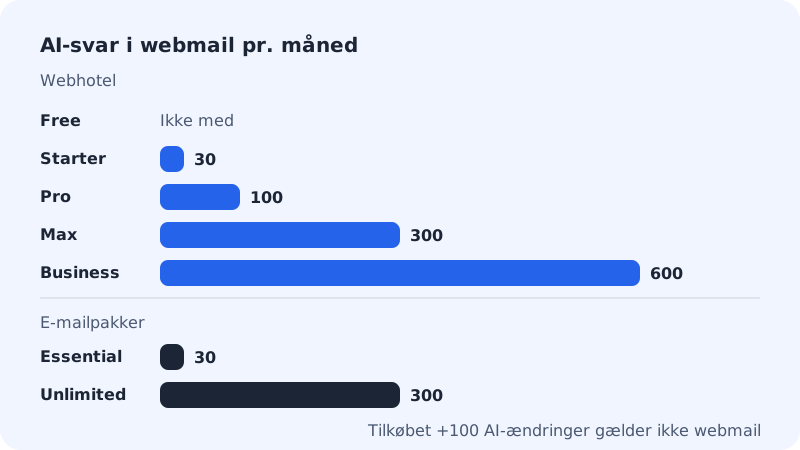
Web hosting plans (per month)
- Free
- Not included
- Starter
- 30 AI replies
- Pro
- 100 AI replies
- Business
- 300 AI replies
- Max
- 600 AI replies
Email-only plans (per month)
- Essential
- 30 AI replies
- Unlimited
- 300 AI replies
The limits reset on the 1st of every month at midnight UTC, and unused AI replies are not carried over.
See your usage
Step 1: If you have web hosting
Open the app builder (
/apps) via the App builder with its own CMS card on the Website builder page. In the AI this month card, the AI replies in webmail row shows, for example, 12 of 100.Step 2: If you only have an email plan
The AI this month card belongs to a web hosting account, so you cannot see it with an email-only plan. The limit is still counted for your account, and the AI in webmail stops when it is used up.
When the limit is used up
Once the month's AI replies are used up, you cannot use the AI in webmail until the limit resets on the 1st. You can still write, send and receive emails as normal.
Frequently asked questions
What does Sitewig count when I use the AI?
The AI replies counter only stores the number of times the AI has been used, not the content of your emails.
Why can I not see AI in my webmail?
AI in webmail is not included in Free. If you have a different plan and cannot find it, contact support.