The registries have fixed rules for when a domain may change provider. The rules protect against fraud and mistakes, but they can delay a transfer. Go through the list below before you order – that way you avoid a rejected transfer.
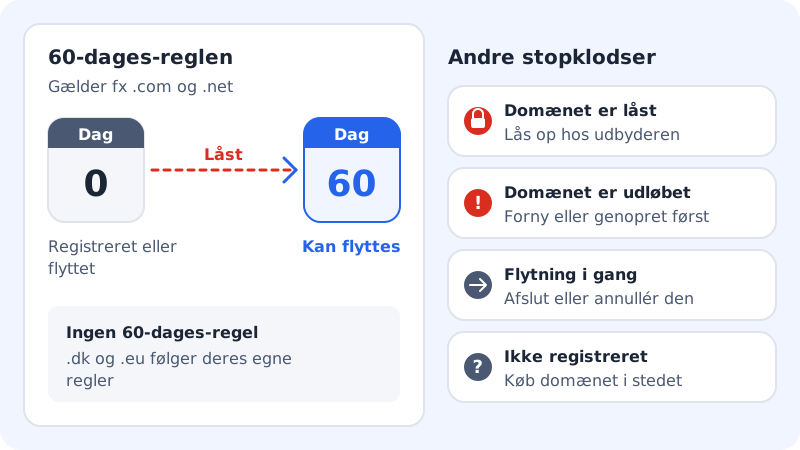
Five things that can stop a transfer
1. The domain is too new or has just been moved
A domain with a generic extension such as .com or .net can only be moved when it is at least 60 days old. The same applies if the domain has been moved to a new provider within the last 60 days. You have to wait until the period has passed. Country extensions such as .eu and .de do not have this rule.
2. The domain is locked
At most providers, domains are locked by default. Turn off the transfer lock at your current provider before you order the transfer. If the registry itself has locked the domain, you must contact the current provider.
3. The domain has expired
If the domain has expired and is about to be deleted, it cannot be moved. Renew or restore it at your current provider first, and move it afterwards.
4. A transfer is already in progress
If a transfer has already been ordered – even to another provider – it must be completed or cancelled before you can start a new one.
5. The domain does not exist or is already at Sitewig
If the domain is not registered at all, it cannot be moved – you can buy it instead on the Register a new domain tab. If it is already in your control panel, you see the message The domain is already connected to Sitewig.
Check the domain before you order
Step 1: Look up the domain
Enter the domain in the WHOIS lookup, and note the creation date, the expiry date and the status.
Step 2: Compare with the list above
Is the domain less than 60 days old, locked or expired? Then fix that first. If everything looks fine, you can move on.
Step 3: Open the transfer
Go to Domains → My domains → Add domain, choose the Transfer a domain to Sitewig tab, and enter the domain in the Domain field, for example
yourcompany.com.Step 4: Order the transfer
Unlock the domain, renew it or wait until the date, and then order the transfer. Follow How to move your domain to Sitewig.
Frequently asked questions
How do I find out when the domain was registered?
The date is usually shown under the domain in your current provider's control panel. You can also look the domain up in Sitewig's free WHOIS lookup.
Does the 60-day rule apply to country extensions such as .eu or .de?
No. The 60-day rule applies to generic extensions such as .com, .net and .org. Country extensions follow the rules of their own registry.
Will I be charged if the transfer is rejected for one of these reasons?
No. If the registry rejects the transfer, you are not invoiced.