With IMAP, your emails stay on Sitewig's mail server and your iPhone or iPad shows a copy. If you read, delete or move an email on your phone, the same happens on your computer and in webmail. Setup takes 3–5 minutes.
What you need
- Your full email address, e.g.
contact@yourcompany.com - The password for that specific mailbox (not your control panel password)
- The server details below
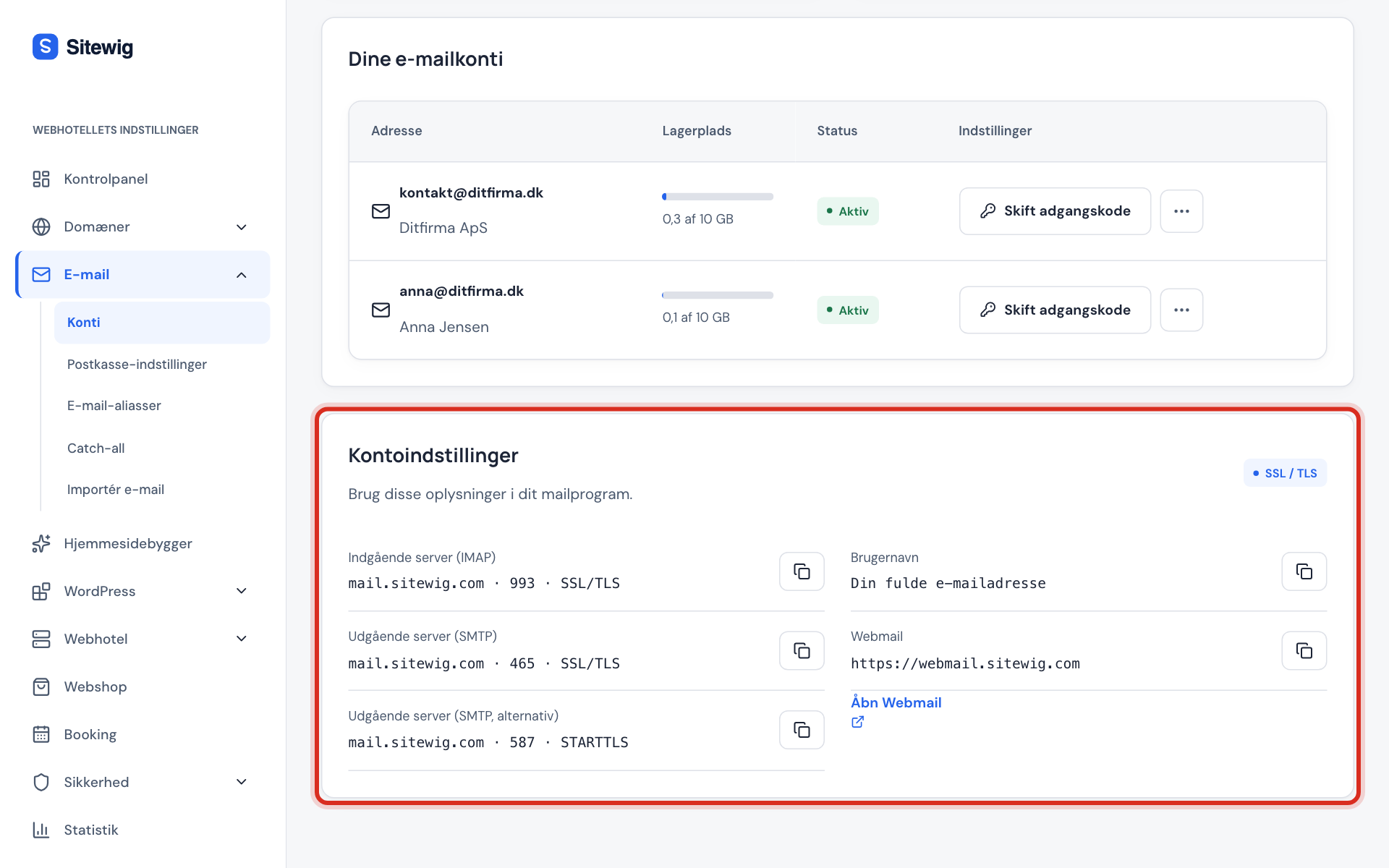
Incoming server (IMAP)
- Host name
mail.sitewig.com- Port
993- Security
- SSL/TLS
- Username
- Your full email address
- Password
- The mailbox password
Outgoing server (SMTP)
- Host name
mail.sitewig.com- Port
465(SSL/TLS) – or587(STARTTLS) if 465 is blocked on your network- Authentication
- Yes – the same username and password as incoming
Add the account on iPhone
Menu names can vary slightly between iOS versions. The steps below follow iOS 18; in older versions the path is Settings → Mail → Accounts.
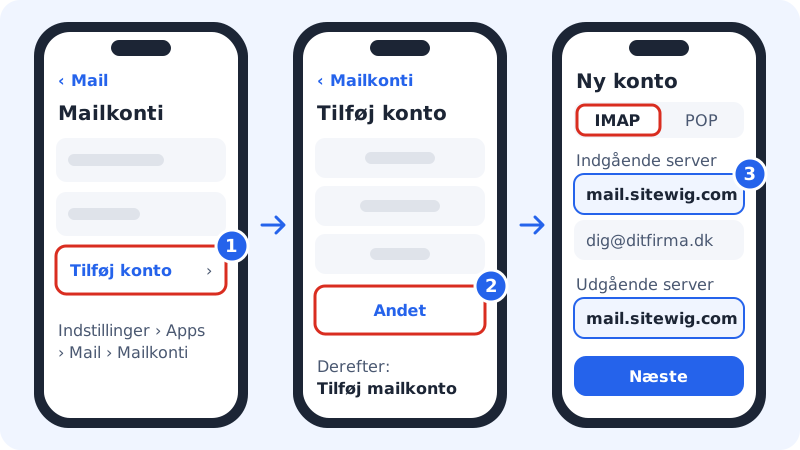
Step 1: Open Mail Accounts
Go to Settings → Apps → Mail → Mail Accounts and tap Add Account.
Step 2: Choose another provider
Tap Other at the bottom of the list and then Add Mail Account. Do not choose iCloud, Google or Outlook – your email is hosted at Sitewig.
Step 3: Enter name, address and password
Fill in Name (what recipients see), Email with your full address and the mailbox Password. Tap Next.
Step 4: Choose IMAP and fill in the servers
Make sure IMAP is selected at the top. Enter
mail.sitewig.comas the host name under both Incoming Mail Server and Outgoing Mail Server. The username is your full email address in both places, and the password is the same.Step 5: Save the account
Tap Next. Your phone checks the connection and turns on SSL by itself. Choose whether notes should sync too, and tap Save.
Check ports and encryption
If receiving or sending does not work, check the advanced settings:
- Go to Settings → Apps → Mail → Mail Accounts and tap the account.
- Tap the account name again and then Advanced. Check that Use SSL is turned on and that Server Port is
993. - Go back and tap SMTP under the outgoing server. Tap the primary server, turn on Use SSL and set Server Port to
465.
Frequently asked questions
Can I use POP instead of IMAP?
No. Sitewig Mail supports IMAP only. Choose IMAP at the top of the form, so your emails look the same on your phone, your computer and in webmail.
I have forgotten the mailbox password. What do I do?
Sign in to the control panel, choose Email → Mailboxes and tap Change password next to the address. Then enter the new password on your phone in the account settings.
Why does my phone say it cannot verify the server identity?
This usually happens when the host name is mistyped, e.g. with www. in front or with your own domain. Use exactly mail.sitewig.com, which has a valid certificate.
My phone uses mail.ayamail.net or mail.fiktomail.dk. Should I change it?
No, the old server names still work and point to the same mail server. If you set up the account again, use mail.sitewig.com.