Sitewig has two AI assistants. Nina helps you create and edit an ordinary website in the website builder. AYA builds apps in the app builder – pages with their own features that a developer would otherwise have to program. You can use both on the same account.
The difference in brief
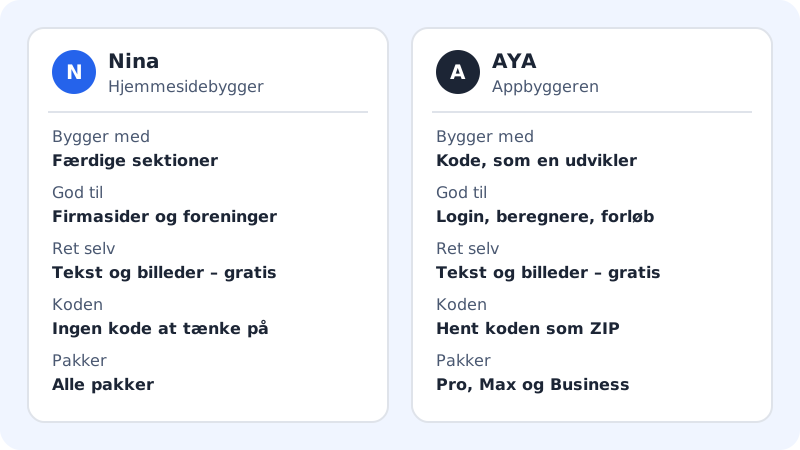
Nina asks you a few questions about your business and then puts together a website from ready-made sections – home page, services, contact and the like. Afterwards you can ask Nina to rewrite text, add a section or translate the website. You never have to think about code.
AYA works like a developer. You describe what your app should do, and AYA writes the code, builds a preview and changes it when you ask. This leaves room for features that do not exist as a ready-made section. You can always download all the code.
Which should you choose?
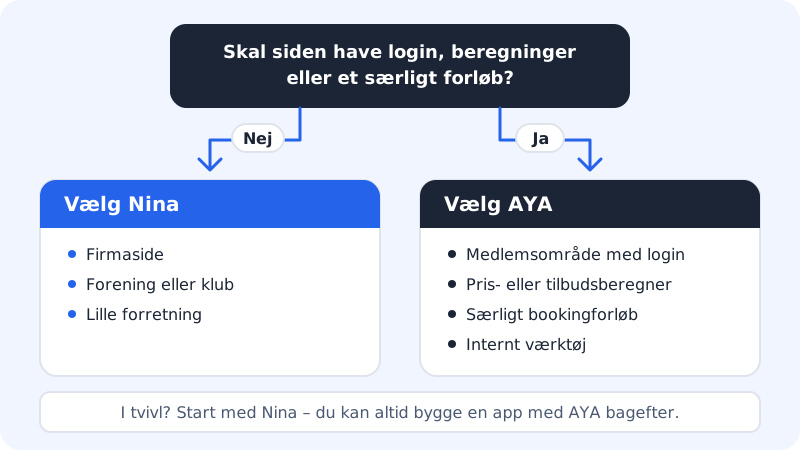
Choose Nina if you need:
- a company website that tells people who you are, what you offer and how to contact you
- a website for an association, a club or a small event
- a website for a small business that you want to be able to edit yourself
Choose AYA if you need:
- a members' area where customers sign in
- a calculator, e.g. a price calculator or a quote form with calculation
- a booking flow that does not fit into a standard solution
- an internal tool for you and your employees
If you are unsure, start with Nina. You can always build an app with AYA later.
Where do you find them?
Step 1: Nina: Website builder
Choose Website builder in the menu in the control panel. Here you create a new website or open an existing one. Inside the editor you write to Nina on the AI tab.
Step 2: AYA: The app builder
The app builder has the address
/appsin the control panel. You find it via the App builder with its own CMS card at the top of the Website builder page – click Build an app (or Continue with … if you already have an app). Here you see your apps and can click Create new app.Step 3: Start an app
On the Create new app page, a guide asks you questions step by step. If you would rather write it yourself, click I would rather describe it all myself and describe the app under What does your business do?. Click Build my app when you are ready.
Which plans include AYA?
Nina is included in all plans. AYA requires a larger plan:
AYA in the plans
- Free and Starter
- Not included
- Pro
- 10 AI changes with AYA per month
- Max
- 25 AI changes and 1 new app with AYA per month
- Business
- 50 AI changes, 2 new apps and 10 AYA Max runs per month
See all the figures in How much AI is included in your plan each month.
Frequently asked questions
Can I use Nina and AYA on the same account?
Yes. They each have their own limits in the plan, and you can see the usage for both in the AI this month card in the app builder.
Can Nina move my website over to an app?
No. A website from the website builder and an app from the app builder are two different things. If you want an app, describe it to AYA, which builds it from scratch.
Can I get the code for my app?
Yes. You can download code that AYA has written as a ZIP file. A website from Nina has no code you need to think about.